Template:Carrier Mapping: Difference between revisions
Template page
m (1 revision imported) |
No edit summary |
||
| Line 1: | Line 1: | ||
{{anchor|Carriers}} | {{anchor|Carriers}} | ||
{{ImageSubtab|Carrier Mapping}} | {{ImageSubtab|Carrier Mapping}} | ||
:* '''Use default carrier | :* '''Use a default carrier''' - When selected, all orders imported from {{{1}}} will use the selected carrier. If this option is unchecked, carriers can be mapped between Fishbowl and {{{1}}}. Each mapping will also set the [[Sales_Order#Details_tab|Sales Order Priority]] so that Fishbowl users can identify orders with express shipping that need to be picked and shipped quickly. | ||
:* '''Use carrier mapping''' - When selected, the table can be used to map carriers between {{{1}}} and Fishbowl. | :* '''Use carrier mapping''' - When selected, the table can be used to map carriers between {{{1}}} and Fishbowl. | ||
Latest revision as of 15:19, 11 January 2023
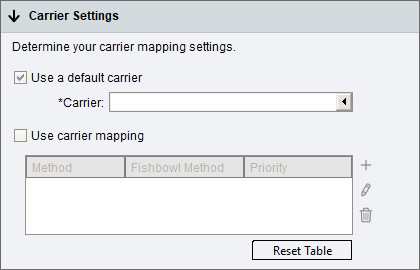
- Use a default carrier - When selected, all orders imported from {{{1}}} will use the selected carrier. If this option is unchecked, carriers can be mapped between Fishbowl and {{{1}}}. Each mapping will also set the Sales Order Priority so that Fishbowl users can identify orders with express shipping that need to be picked and shipped quickly.
- Use carrier mapping - When selected, the table can be used to map carriers between {{{1}}} and Fishbowl.
