Template:International Taxes: Difference between revisions
Template page
No edit summary |
No edit summary |
||
| (2 intermediate revisions by the same user not shown) | |||
| Line 1: | Line 1: | ||
===Canada/Australia/International=== | ===Canada/Australia/International=== | ||
::When using the {{{1 | ::When using the {{{1}}} plugin with international versions of Fishbowl, some additional tax options are available in the '''Tax Settings''' section of the '''Order Import''' tab. | ||
::* '''Use product tax''' - When selected, the '''Tax Code''' from the {{ModuleTab|Product|General}} will be used.<br>[[File:AU NZ Taxes.png]] | |||
::* '''Use province tax''' - When selected, the shipping province on the order will be used to determine the tax, based on the mapping table below.<br>[[File:International Tax Province.png]] | |||
::* '''Use | |||
::* '''Use | |||
Latest revision as of 17:13, 30 September 2022
Canada/Australia/International
- When using the {{{1}}} plugin with international versions of Fishbowl, some additional tax options are available in the Tax Settings section of the Order Import tab.
- Use product tax - When selected, the Tax Code from the General tab of the
 Product module will be used.
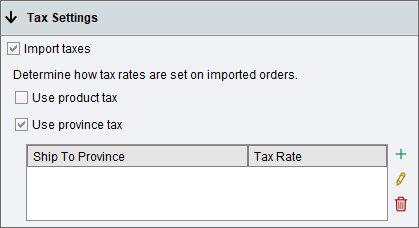
- Use province tax - When selected, the shipping province on the order will be used to determine the tax, based on the mapping table below.
- Use product tax - When selected, the Tax Code from the General tab of the
- When using the {{{1}}} plugin with international versions of Fishbowl, some additional tax options are available in the Tax Settings section of the Order Import tab.

