Report Reconcile Report: Difference between revisions
From Fishbowl Advanced
m (Text replacement - ".png|border|800px|link={{filepath" to ".png|right|border|800px|link={{filepath") Tag: Reverted |
m (Text replacement - "{{BackToReports}} " to "") Tag: Manual revert |
||
| (One intermediate revision by the same user not shown) | |||
| Line 1: | Line 1: | ||
[[File:Report-Reconcile Report.png|right|border|400px|link={{filepath:Report-Reconcile Report.png}}]] This report generates a list of POs that have been reconciled, and it displays the original cost, the billed cost, and the landed cost. The '''Billed Total''' will be {{r|red}} if it is more than the '''Original Total''' and {{g|green}} if it is less than '''Original Total'''. If [[Currency|currency conversion]] is enabled, the costs can be displayed in the vendor's default currency. | |||
The {{Button|Modify Report}} allows the following report filters to be customized:<br> | The {{Button|Modify Report}} allows the following report filters to be customized:<br> | ||
{{Spacer}}'''OPTIONAL TAB''' | {{Spacer}}'''OPTIONAL TAB''' | ||
Latest revision as of 21:16, 12 March 2025
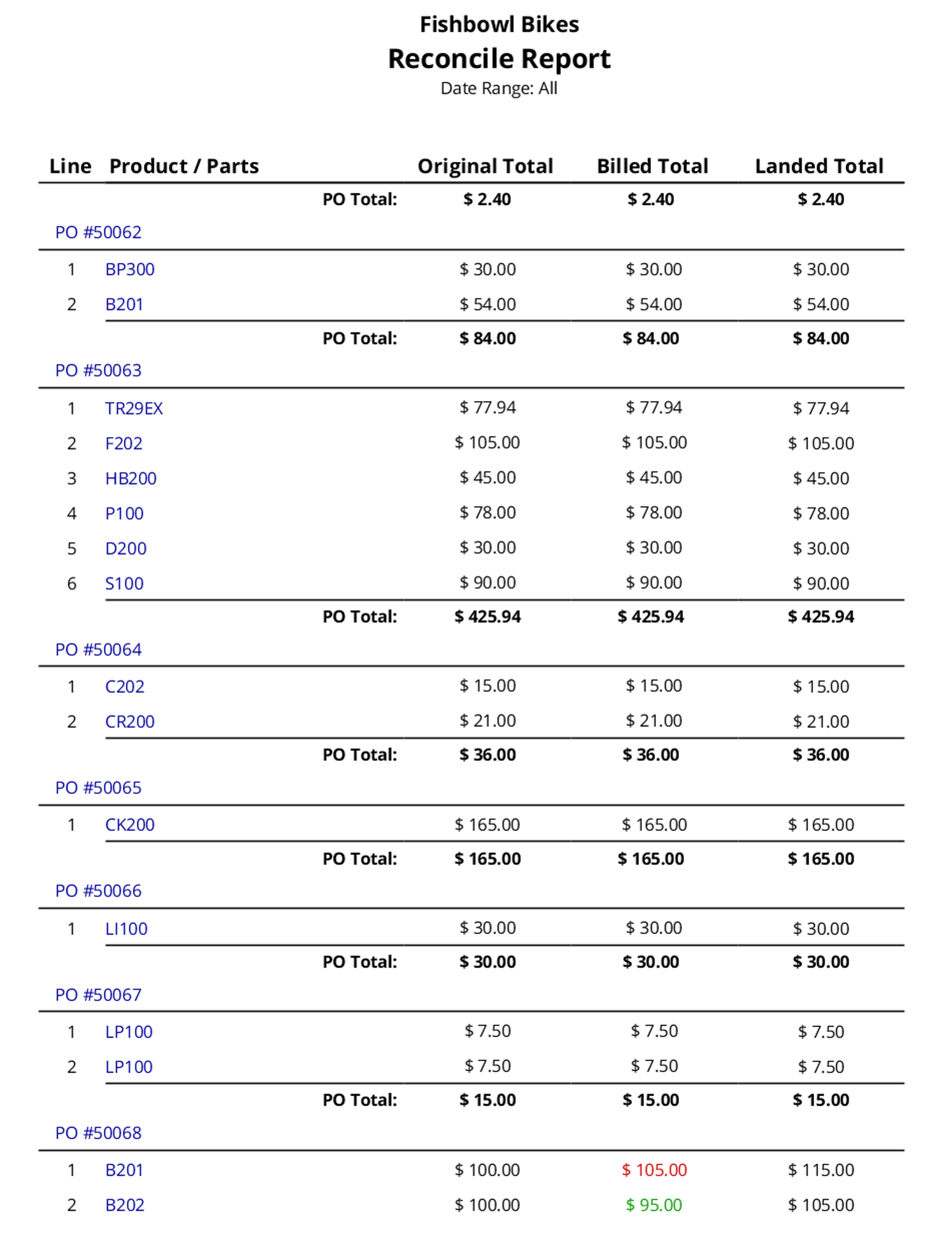
This report generates a list of POs that have been reconciled, and it displays the original cost, the billed cost, and the landed cost. The Billed Total will be red if it is more than the Original Total and green if it is less than Original Total. If currency conversion is enabled, the costs can be displayed in the vendor's default currency.
The  Modify Report button allows the following report filters to be customized:
- OPTIONAL TAB
- PO Number - Select a Purchase Order number to run the report for. Leave this field blank to run for all Purchase Orders.
- Part Number - Choose a part number to run the report for. Leave this field blank to run for all parts.
- Date Range - Choose a date range to run the report for. This date range looks at the DateReconciled on the RECEIPTITEM table in the database, meaning the date the item was reconciled.
- HIDE/SHOW TAB - Choose which columns to show/hide on the report by checking/unchecking the checkbox next to each column name.
- Format Report for Exporting - Removes the page breaks and displays the report on one long page for exporting to CSV, Excel, and other formats.
- PRINTER TAB - Allows a default printer to be specified for the report in each location group.