Template:Order Import: Difference between revisions
Template page
m (1 revision imported) |
No edit summary |
||
| Line 1: | Line 1: | ||
{{ImageTab|Order Import|{{{1|Cart}}}}} | {{ImageTab|Order Import|{{{1|Cart}}}}} | ||
{{Schedule|import orders|Run task}} If additional options are available, they can be enabled by selecting '''Use Advanced Options''' at the bottom of the '''Schedule''' section.<br>[[File:Schedule Options.png]] | {{Schedule|import orders|Run task}} If additional options are available, they can be enabled by selecting '''Use Advanced Options''' at the bottom of the '''Schedule''' section.<br>[[File:{{{1|Cart}}} Schedule Options.png]] | ||
Revision as of 13:54, 15 December 2022

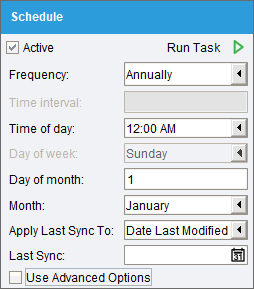
- Schedule - Select the
 Active checkbox to import orders on a set schedule. Click the
  Run task button to run the scheduled task right now. Data that has changed since the Last Sync date will be synchronized. This date will be updated automatically after a sync, or it can be manually edited to adjust which data will be synchronized. If additional options are available, they can be enabled by selecting Use Advanced Options at the bottom of the Schedule section.