Template:International Taxes: Difference between revisions
Template page
No edit summary |
No edit summary |
||
| Line 1: | Line 1: | ||
==Canada/Australia/International== | ===Canada/Australia/International=== | ||
::When using the {{{1|}}} plugin with international versions of Fishbowl, taxes are set for each product using the '''Tax Code''' field in the {{Module|Product}}.<br>[[File:AU NZ Taxes.png]] | ::When using the {{{1|}}} plugin with international versions of Fishbowl, taxes are set for each product using the '''Tax Code''' field in the {{Module|Product}}.<br>[[File:AU NZ Taxes.png]] | ||
::Some international tax options are also available in the '''Tax Settings''' section of the '''Order Import''' tab. | ::Some international tax options are also available in the '''Tax Settings''' section of the '''Order Import''' tab. | ||
Revision as of 16:31, 30 September 2022
Canada/Australia/International
- When using the plugin with international versions of Fishbowl, taxes are set for each product using the Tax Code field in the
 Product module.
- Some international tax options are also available in the Tax Settings section of the Order Import tab.
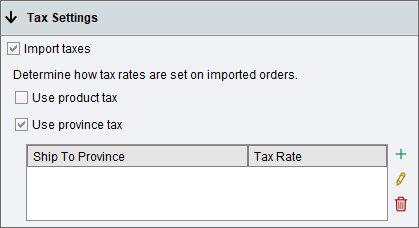
- Use Customer Tax Code - When selected, orders imported from Adobe Commerce with tax will use the customer assigned tax code in Fishbowl. The tax amount on the Fishbowl sales order will be calculated using the tax code assigned in Fishbowl. If no tax code is assigned to the customer, the order will fail to import. New customers created will use the default tax code assigned in Fishbowl.
- Use Customer Tax Code - When selected, orders imported from Adobe Commerce with tax will use the associated product tax codes in Fishbowl.
- Use Tax By Province - When selected, orders imported from Adobe Commerce with tax will use orders ship to province to determine the orders tax in Fishbowl.
- When using the plugin with international versions of Fishbowl, taxes are set for each product using the Tax Code field in the

