Purchasing Dashboard: Difference between revisions
From Fishbowl Advanced
No edit summary |
No edit summary |
||
| Line 1: | Line 1: | ||
{{Module Introduction|Purchasing Dashboard|Purchasing}} | {{Module Introduction|Purchasing Dashboard|Purchasing}} provides businesses with crucial insights into their procurement processes. By streamlining purchasing data into actionable insights, companies can improve supplier negotiations, optimize inventory levels, and manage purchasing costs effectively. | ||
* In the '''Date Range''' field, select the date range you would like to view. | * In the '''Date Range''' field, select the date range you would like to view. | ||
* In the '''Previous Range''' field, select a date range for comparison. | * In the '''Previous Range''' field, select a date range for comparison. | ||
== Key Features == | |||
* Top Selling by Vendor: Evaluate which vendors are providing the most popular products, helping to strengthen supplier relationships. | |||
* Top Margins by Vendor: Analyze vendor profitability to negotiate better terms and prioritize high-margin products. | |||
* Inventory Value: Keep track of the financial investment in your inventory to manage cash flow effectively. | |||
* Days in Inventory: Measure how long inventory sits before being sold, identifying inefficiencies in inventory turnover. | |||
* Orders Closed Short: Monitor orders that were not fulfilled completely, allowing for better supply chain management. | |||
* Purchases by Type: Differentiate spending on inventory, shipping, and services to manage costs efficiently. | |||
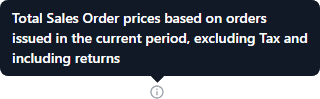
* Click any of the {{Icon Button|Information|4=icons}} for more details.<br>[[File:Sales Dashboard i.png]] | |||
Revision as of 08:28, 13 August 2024
 The Purchasing Dashboard module, located in the
  Purchasing group, provides businesses with crucial insights into their procurement processes. By streamlining purchasing data into actionable insights, companies can improve supplier negotiations, optimize inventory levels, and manage purchasing costs effectively.
- In the Date Range field, select the date range you would like to view.
- In the Previous Range field, select a date range for comparison.
Key Features
- Top Selling by Vendor: Evaluate which vendors are providing the most popular products, helping to strengthen supplier relationships.
- Top Margins by Vendor: Analyze vendor profitability to negotiate better terms and prioritize high-margin products.
- Inventory Value: Keep track of the financial investment in your inventory to manage cash flow effectively.
- Days in Inventory: Measure how long inventory sits before being sold, identifying inefficiencies in inventory turnover.
- Orders Closed Short: Monitor orders that were not fulfilled completely, allowing for better supply chain management.
- Purchases by Type: Differentiate spending on inventory, shipping, and services to manage costs efficiently.
- Click any of the
 Information icons for more details.