Template:Discrepancies: Difference between revisions
Template page
No edit summary |
No edit summary |
||
| Line 6: | Line 6: | ||
** '''Back dating transactions''' - When you record a transaction in Fishbowl, there might be a legitimate reason to select a date other than today. Just be aware that frequent back dating, especially for a month that has already closed, can cause discrepancies. | ** '''Back dating transactions''' - When you record a transaction in Fishbowl, there might be a legitimate reason to select a date other than today. Just be aware that frequent back dating, especially for a month that has already closed, can cause discrepancies. | ||
** '''Accounts didn't match in the beginning''' - It's important to make sure that the balances in {{{1|your accounting software}}} match the values in Fishbowl when you go live. | ** '''Accounts didn't match in the beginning''' - It's important to make sure that the balances in {{{1|your accounting software}}} match the values in Fishbowl when you go live. | ||
** '''Skipped reconciliation''' - Reconciling is an important part of the accounting process. We recommend that you [[Schedule|automatically schedule]] key reports from Fishbowl to be saved every day at the same time that you automatically export to {{{1|your accounting software}}} so that if you have questions at a later date, you can go back to the date in question for more details. | ** '''Skipped reconciliation''' - Reconciling is an important part of the accounting process. We recommend that you [[Schedule|automatically schedule]] key reports from Fishbowl to be saved every day at the same time that you automatically export to {{{1|your accounting software}}} so that if you have questions at a later date, you can go back to the date in question for more details.<br><br>'''So remember...'''<br><br> | ||
** Nearly everything should be done in Fishbowl and then exported to {{{1|your accounting software}}}. | |||
So remember... | ** Make sure that all changes in {{{1|your accounting software}}} are done under the supervision of an accountant that understands Fishbowl. | ||
* Nearly everything should be done in Fishbowl and then exported to {{{1|your accounting software}}}. | ** You should not ask Fishbowl employees to make changes in {{{1|your accounting software}}}. | ||
* Make sure that all changes in {{{1|your accounting software}}} are done under the supervision of an accountant that understands Fishbowl. | ** If you find yourself in a situation that needs an expert, we can put you in contact with an independent consultant. To get you started, we've compiled a list of some consultants that customers have worked with in the past. These consultants have years of experience as well as many free online resources, such as video tutorials and troubleshooting articles. For example, we asked a consultant to put together a document related to reconciling accounting discrepancies, which you can download [https://fishbowlhelp.com/files/Reconciling-Discrepancies.pdf here]. | ||
* You should not ask Fishbowl employees to make changes in {{{1|your accounting software}}}. | |||
* If you find yourself in a situation that needs an expert, we can put you in contact with an independent consultant. To get you started, we've compiled a list of some consultants that customers have worked with in the past. These consultants have years of experience as well as many online resources, such as video tutorials and troubleshooting articles. For example, we asked | |||
Revision as of 11:34, 9 October 2024
- Why don't the values in my QuickBooks or Xero accounts match what is in Fishbowl? Why are their discrepancies?
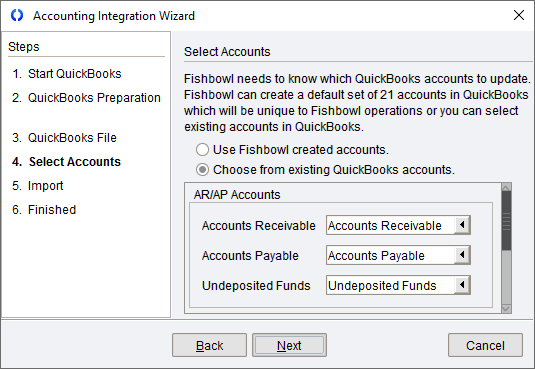
- Account Mapping - One of the most common causes of discrepancies between Fishbowl and your accounting software relate to how the default accounts are mapped. When you integrate, you select which accounts you want Fishbowl to export to. This is a crucial step, but perhaps you were in a hurry or didn't consult with your accountant. You can review and modify your account mappings at any time by opening the Accounting integration wizard.
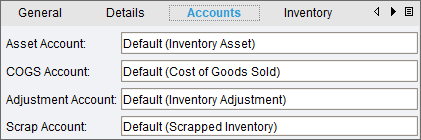
- Specific Part and Product Accounts - In addition to the default accounts mentioned above, each part and product can also be configured in Fishbowl to export to specific accounts in your accounting software. For example, if you assume that all of your parts are using the same COGS account, but a few parts are actually mapped to a different account, then you may think there is a discrepancy because the values are divided among multiple accounts.
- Making changes in your accounting software instead of Fishbowl - In most circumstances, all transactions and changes should be recorded in Fishbowl and then exported to your accounting software. If you manually change a transaction in your accounting software, Fishbowl won't know about it and then the accounts may not match. For example, don't manually change an Item Receipt to a Bill in your accounting software. Instead, reconcile it in Fishbowl and then export it to QuickBooks or Xero.
- Unauthorized editing - Changes should only be made in QuickBooks or Xero under the supervision of your accountant. For example, don't give your warehouse workers access to delete journal entries.
- Back dating transactions - When you record a transaction in Fishbowl, there might be a legitimate reason to select a date other than today. Just be aware that frequent back dating, especially for a month that has already closed, can cause discrepancies.
- Accounts didn't match in the beginning - It's important to make sure that the balances in your accounting software match the values in Fishbowl when you go live.
- Skipped reconciliation - Reconciling is an important part of the accounting process. We recommend that you automatically schedule key reports from Fishbowl to be saved every day at the same time that you automatically export to your accounting software so that if you have questions at a later date, you can go back to the date in question for more details.
So remember... - Nearly everything should be done in Fishbowl and then exported to your accounting software.
- Make sure that all changes in your accounting software are done under the supervision of an accountant that understands Fishbowl.
- You should not ask Fishbowl employees to make changes in your accounting software.
- If you find yourself in a situation that needs an expert, we can put you in contact with an independent consultant. To get you started, we've compiled a list of some consultants that customers have worked with in the past. These consultants have years of experience as well as many free online resources, such as video tutorials and troubleshooting articles. For example, we asked a consultant to put together a document related to reconciling accounting discrepancies, which you can download here.
- Account Mapping - One of the most common causes of discrepancies between Fishbowl and your accounting software relate to how the default accounts are mapped. When you integrate, you select which accounts you want Fishbowl to export to. This is a crucial step, but perhaps you were in a hurry or didn't consult with your accountant. You can review and modify your account mappings at any time by opening the Accounting integration wizard.

