Update Fishbowl: Difference between revisions
From Fishbowl Advanced
No edit summary |
No edit summary |
||
| Line 1: | Line 1: | ||
Updated versions of Fishbowl are typically released once a month and include new features and improvements. It only requires a few minutes to update Fishbowl and take advantage of the latest changes. Fishbowl also has the ability to push critical updates and patches in the middle of a release cycle. In this case, you will see an update window when starting the Fishbowl server. | Updated versions of Fishbowl are typically released once a month and include new features and improvements. It only requires a few minutes to update Fishbowl and take advantage of the latest changes. Fishbowl also has the ability to push critical updates and patches in the middle of a release cycle. In this case, you will see an update window when starting the Fishbowl server. | ||
<noinclude>__NOTOC__</noinclude> | <noinclude>__NOTOC__</noinclude> | ||
* | * Most major updates require a current support contract. | ||
* In most cases, backup files are not needed, but it is still highly recommended to copy critical files to the Desktop or another safe location. | * In most cases, backup files are not needed, but it is still highly recommended to copy critical files to the Desktop or another safe location. | ||
*# Follow the steps to [[FAQs#How_do_I_backup_my_Fishbowl_database.3F|create a backup of the MySQL database]]. | *# Follow the steps to [[FAQs#How_do_I_backup_my_Fishbowl_database.3F|create a backup of the MySQL database]]. | ||
Revision as of 20:56, 7 December 2022
Updated versions of Fishbowl are typically released once a month and include new features and improvements. It only requires a few minutes to update Fishbowl and take advantage of the latest changes. Fishbowl also has the ability to push critical updates and patches in the middle of a release cycle. In this case, you will see an update window when starting the Fishbowl server.
- Most major updates require a current support contract.
- In most cases, backup files are not needed, but it is still highly recommended to copy critical files to the Desktop or another safe location.
- Follow the steps to create a backup of the MySQL database.
- Browse to C:\Program Files\Fishbowl\data\backups and copy the most recent backup file to the Desktop.
- Copy C:\Program Files\Fishbowl\plugins to the Desktop
- Copy C:\Program Files\Fishbowl\database\images to the Desktop
- Copy C:\Program Files\Fishbowl\server\reports to the Desktop
- The auto update settings can be customized in the Fishbowl Server Administration by right-clicking the Fishbowl Server tray icon and selecting Options.
File:Auto update settings.png
Auto update
With the auto update, there is no need to run an installer, and in most cases, only a few small files will be downloaded to complete the update. Plugins are automatically updated when Fishbowl is updated to the latest version.
- Fishbowl will display a notification in the client when an update is available. Click Start Server Download to download the update.

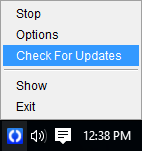
- Alternatively, right-click the Fishbowl Server tray icon, select Check For Updates, and then click Update Fishbowl.
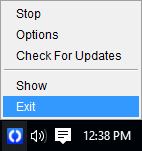
- Restart the server by right-clicking the Fishbowl Server tray icon and selecting Exit.
- Then start the Fishbowl server from the desktop or the list of programs.

- When the server restarts, click Yes to apply the updates.

- Click OK to start the database update.
File:Database update.png - All client computers will update automatically when connecting to the updated Fishbowl Server.
- If the auto update fails, follow the instructions here to manually download and install Fishbowl into the same directory where Fishbowl is currently installed.