Template:Payment Mapping: Difference between revisions
Template page
m (1 revision imported) |
No edit summary |
||
| Line 2: | Line 2: | ||
:* '''Create payments in Fishbowl''' - When selected, payments from the {{{1}}} transaction will be shown in the {{Module|Payment Viewer}}. | :* '''Create payments in Fishbowl''' - When selected, payments from the {{{1}}} transaction will be shown in the {{Module|Payment Viewer}}. | ||
::* '''Use a default payment method''' - When selected, all orders imported from {{{1}}} will use the selected payment method. | ::* '''Use a default payment method''' - When selected, all orders imported from {{{1}}} will use the selected payment method. | ||
::* '''Use | ::* '''Use payment method mapping''' - When selected, the table can be used to map payment methods between {{{1}}} and Fishbowl. | ||
::* '''Always create payments''' - If no payment data exists for the order from {{{1}}}, this option will always create a payment in Fishbowl equaling the order total. If payment mapping is enabled, orders without payment data will show "None" as the payment method type. | ::* '''Always create payments''' - If no payment data exists for the order from {{{1}}}, this option will always create a payment in Fishbowl equaling the order total. If payment mapping is enabled, orders without payment data will show "None" as the payment method type. | ||
::* '''Remove taxes from payment''' - When selected, the tax amount will be deducted from the payment total. | ::* '''Remove taxes from payment''' - When selected, the tax amount will be deducted from the payment total. | ||
Latest revision as of 13:38, 7 March 2023
-
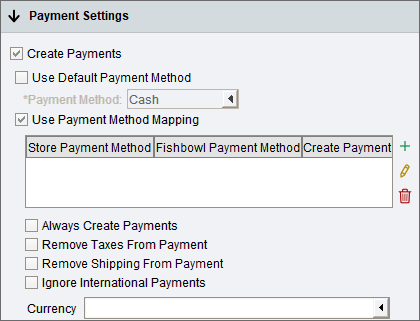
- Create payments in Fishbowl - When selected, payments from the {{{1}}} transaction will be shown in the
 Payment Viewer module.
- Use a default payment method - When selected, all orders imported from {{{1}}} will use the selected payment method.
- Use payment method mapping - When selected, the table can be used to map payment methods between {{{1}}} and Fishbowl.
- Always create payments - If no payment data exists for the order from {{{1}}}, this option will always create a payment in Fishbowl equaling the order total. If payment mapping is enabled, orders without payment data will show "None" as the payment method type.
- Remove taxes from payment - When selected, the tax amount will be deducted from the payment total.
- Remove shipping from payment - Enabling this option may lead to order disparities between {{{1}}} and Fishbowl for totals and payments.
- Ignore international payments - Payments will not be created for orders placed outside the United States. This setting is only available if Use Currency Conversion is enabled in the
 Currency module.
 - Currency - Select the currency type you accept in {{{1}}}. This is a required setting if Use Currency Conversion is enabled in the Currency module.
- Create payments in Fishbowl - When selected, payments from the {{{1}}} transaction will be shown in the
