Template:Rename: Difference between revisions
Template page
m (1 revision imported) |
No edit summary |
||
| Line 1: | Line 1: | ||
# Open the {{Module|Company}} and change the company name so that you can distinguish between the two databases.<br>[[File:Sandbox Company Name.png]] | # Open the {{Module|Company}} and change the company name so that you can distinguish between the two databases.<br>[[File:Sandbox Company Name.png]] | ||
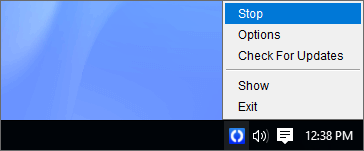
# You will need to stop and then start the Fishbowl | # You will need to stop and then start the Fishbowl Server to apply the name change. Right-click the Fishbowl Server icon in the system tray and click '''Stop'''.<br>[[File:Stop Server Wide.png]] | ||
# Right-click the Fishbowl Server icon in the system tray and click '''Start''' to apply the name change.<br>[[File:Start Server Wide.png]] | # Right-click the Fishbowl Server icon in the system tray and click '''Start''' to apply the name change.<br>[[File:Start Server Wide.png]] | ||
Revision as of 10:51, 18 April 2023
- Open the
 Company module and change the company name so that you can distinguish between the two databases.

- You will need to stop and then start the Fishbowl Server to apply the name change. Right-click the Fishbowl Server icon in the system tray and click Stop.
- Right-click the Fishbowl Server icon in the system tray and click Start to apply the name change.


