Fishbowl Payments
Fishbowl Payments allows credit cards and ACH payments to be processed from within Fishbowl Advanced. Additionally, payment links can be included in emails and invoices.
Getting started
- Expand the Integrations module group and then open the
 Payment Gateway module.
- If you don't have a Fishbowl Payments account, click the blue button to get started. If you already have a Fishbowl Payments account, click Enter credentials here and skip to the Approved section below.

- Make any needed changes to the pre-populated fields and then click Sign Up.

- Click Reset your password near the bottom of the browser window that opens.

- Type your email address that was entered previously and then click the Send Email button.
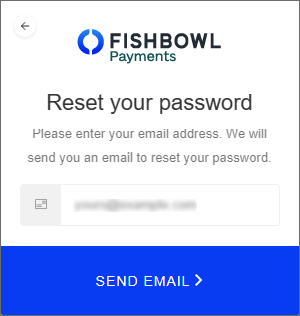
- You will then receive an email that allows you to create a new password and begin your application.
- The current status of your application will be displayed on the Gateway tab where you can click the link to provide any requested information.

- When the Underwriting Status is Approved and the Account Status is Active, you're ready to continue.


Approved
- After your account is approved, credit card and ACH payments will be processed using the Fishbowl Payments gateway.
- If Use Card on File is enabled on the Settings tab, cards can be securely remembered by selecting Store Card on File after entering the card details.

- Stored cards can then be viewed on the Card on File tab of the
 Customer module and can be selected as the Method when processing payments.
- You can also generate payment links to send to your customers, or to include on invoices and reports.


Payment links
- To enable payment links, open the Payment Gateway module, click the Settings tab, and then verify that Enable Payment Links is enabled.
- To generate a payment link, open an issued sales order and click the
 Payment Link button at the top of the module. A Pay Online button will then be added to the bottom of the Sales Order Report.
- The text of the Pay Online button can be customized on the Field Titles tab of the Sales Order Report.
- There is a setting on the Optional tab of the Sales Order Report to hide or show the Pay Online button.
- The payment link can also be copied and manually sent to customers.


Settings
The following options are available on the Settings tab of the Payment Gateway module.
- Use Card on File - Allows cards to be securely stored for reuse (PCI compliant).
- Show CVC - Enables a user to enter a CVC number when taking payments.
- Enable Payment Links - Allows users to generate a payment link for sales orders.
- Allowed Payment Methods - Users can select which payment methods are available when a customer utilizes the payment link.
- Allow Partial Payments - Allows customers to make partial payments using the payment link. If this option is disabled, the customer will need to pay in full.
- Allow Tips - Allows customers to add a tip when using the payment link.
- Time of Day - Allows the user to decide what time of day to import online payments into Fishbowl. Users can also manually run the scheduled task in the
 Schedule module at any time.
 - Payment Method for Imported Payments - Allows users to determine how imported payments will be categorized in Fishbowl.
FAQs
Below are some answers to frequently asked questions about Fishbowl Payments.
How does the signup process work?
The online application that users have to fill out can feel daunting. With our data automation enhancements, we pass through more information so you have less to fill out on the application.
When you sign up for Fishbowl Payments in Fishbowl, a dialogue box will appear with data fields for you to fill in. This dialogue box will automatically populate with your data. When you're done, click Sign up to be redirected to a login page within a Web browser.
How long does it typically take for me to be approved for payments?
The underwriting status generally takes 24 hours or less. Fishbowl users signing up for Fishbowl Payments will be able to view their account and underwriting statuses in Fishbowl so they can self-serve and see exactly where their payments account and application stand.
From the moment you hit Sign up you'll be notified of where you are in the process. That way, you can quickly start collecting payments or provide more information to correct errors.
How much does Fishbowl Payments cost?
Fishbowl Payments is part of Fishbowl's core functionality, and it is offered at no additional cost for new and existing Fishbowl users.
PLEASE NOTE: In Fishbowl Payments, Credit Card Processing fees apply at a flat rate:
- Credit Card (non-AMEX) 2.85% + 10¢
- Credit Card (AMEX) 2.85% + 10¢
- ACH 1% + 25¢ (no ACH fee cap)
Will CC processing fees apply?
Yes. Click here for more information.
Is Fishbowl Payments PCI compliant?
Yes. Fishbowl users processing with Fishbowl Payments will be able to store their customers' credit card information on file in a safe and secure manner. You will not have to re-key your customers' card information every time you charge a payment. With one click, you can charge your customer's card on a sales order.
Can I have multiple cards on file for a single customer?
Yes.
Can I issue a refund using the Card on file payment method?
No. To issue a refund, you will need to perform that action in the Payment Viewer module or select the payment method Refund Credit Card on the credit return SO.
Can I issue refunds from Fishbowl Payments?
Not currently. We recommend that any refunds happen within the Fishbowl application. This ensures that transaction data is current and accurate.
Can I issue a refund to a different credit card than what was used on the original Fishbowl sales order?
No. To issue a refund on a particular Fishbowl sales order, you must refund the credit card that was used on the original transaction.
Who is Fishbowl Payments for?
- Existing customers who already use StaxPay.
- Existing customers who do not already use a payment gateway.
- Existing customers who already use a payment gateway but do not use StaxPay (excluding Clover customers).
- New users who are looking to purchase Fishbowl and require a flexible means of processing payments.
- Existing Fishbowl customers.
PLEASE NOTE: Cannabis and some Firearms businesses will not be able to use Fishbowl Payments.
What benefits does Fishbowl Payments offer?
- Confidence in every step of the process: From the moment you hit Sign up you'll be notified where you stand in the process so you can start collecting payments as soon as possible.
- More accuracy, better decisions: With better visibility into your Accounts Receivable and Invoice Total Outstanding for Customers, you can make better decisions for your business.
- More convenient payment for your most loyal customers: Eliminate more manual processes, cut down on human error, and save valuable time by storing customers' credit cards on file so you can quickly and easily charge payments to your customers.
- Send payment links to customers: Fishbowl Payments gives you the ability to send payment links to your customers right from Fishbowl. You can copy and paste the payment link into an email message or simply email your customer a copy of the Sales Order Report from Fishbowl.
- Manage payments easily and get paid faster: Add a Pay Now link to customer invoices with the click of a button, making collecting payments even easier for you and more convenient for your customers. Offer a more-convenient payment experience for your customers so you get paid on time, faster.
- Send scheduled payment reminders: With Fishbowl Payments, you can send scheduled payment reminders so you are top of mind for customers. Schedule payment link imports so you are reconciling your payments (even tips) automatically every day.
Will I be able to process ACH payments with Fishbowl Payments?
We anticipate releasing ACH as part of the full Fishbowl Payments portal in the near future.
Can I adjust the number of times, and at what intervals, I schedule payment link imports?
Right now, Fishbowl will sync payments at daily intervals at the time you specify. If that changes based on customer feedback, we can adjust in product.
Can I enable my customers to send down payments?
You can allow partial payments as a global setting. The down payment workflow could function with having two separate sales orders. We will evaluate a better workflow for future releases.
Is there a time limit to how long a payment link is active?
The payment link lives forever on the Fishbowl Payments side and will always remain active on the sales order it's attached to.
PLEASE NOTE: There is one unique payment link per sales order. You can copy and paste the link wherever you want.
How does the payment page get updated automatically? What triggers the update, and how does the update happen?
When you click Save on the sales order, the payment page will update and reflect the new changes.
What reports have the Payment button?
The Payment button is active on the Sales Order Report. We are waiting to get customer feedback to learn which other reports our customers would like to see the Payment button on. We decided to postpone adding it to the Shipping Invoice due to partial shipment/payment considerations, but we intend to find a solution for this.
When I modify a sales order, will it modify the total owed on a payment link?
Yes.
Where are payment links stored in the database for review?
payment links are stored on the Sales Order, SO table called SO.payment link.
Is the value stored on the SO table a URL or some form of encrypted data?
It is a URL.
Are there automatic payment links?
No, but they are on the roadmap. We will be adding that functionality at some point in the future. Stay tuned.
Do payment links prohibit me from deleting sales orders?
Not at all. You would want to delete the sales order as well as the payment link separately in the Fishbowl Payments portal. However, we have on the roadmap a plan to add an automation to delete the payment link when a sales order is deleted in Fishbowl.
Will I be able to set partial payments for some customers and not others?
No, you will not be able to turn that feature on or off on a customer-by-customer basis. It's a global setting for now. Stay tuned, though, because that could change in the future.
PLEASE NOTE: When you generate the payment link, you can turn it on, and then send the link and later turn it off.
How do I get notified that a payment has gone through?
You can set up automatic email notifications in the Fishbowl Payments portal for when an online payment is received.
Is there a Payments Received report that displays the payments that have been processed?
All that information is available in the Fishbowl Payments portal. We can investigate building a report like this if there's demand for it.