Purchase Orders
From Fishbowl Drive

- The Purchase Order module allows items to be purchased from vendors.
- To create a new purchase order, click the
 New button. Each existing purchase order is displayed in the search area on the left.
- After all items have been added to the order, click the ISSUE button in the action bar at the top of the order.
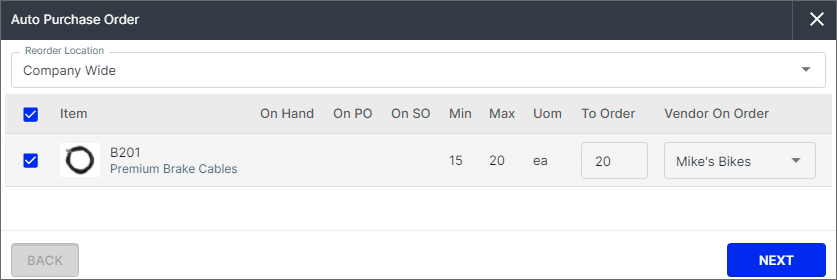
- Click the AUTO ORDER button to automatically create purchase orders based on reorder points.
- To import orders from a spreadsheet or CSV file, click the
 More button at the top of the item list and choose Import Orders.
- To create a template file with the correct column headers, click Export Orders.
- The suggested order of CSV imports for new databases can be found here.
- For a step-by-step tutorial on working with CSV files, check out the CSV video here.
- Below is a list of the CSV columns. All column headers are required. Columns with an asterisk must contain data.
- PurchaseOrder-Number*
- PurchaseOrder-VendorName*
- PurchaseOrder-DateScheduled
- PurchaseOrder-PurchaseOrderStatus - New purchase order gets BID_REQUEST by default
- PurchaseOrder-CustomerSONumber
- PurchaseOrder-VendorSONumber
- PurchaseOrder-BuyerName
- PurchaseOrder-CarrierName*
- PurchaseOrder-CarrierServiceName
- PurchaseOrder-VendorAddressName
- PurchaseOrder-VendorAddressCity
- PurchaseOrder-VendorAddressState
- PurchaseOrder-VendorAddressCountry - For example, US or United States. Click here to see the list of supported countries and codes.
- PurchaseOrder-VendorAddressPostalCode
- PurchaseOrder-ShipToName
- PurchaseOrder-ShipToStreet
- PurchaseOrder-ShipToCity
- PurchaseOrder-ShipToState
- PurchaseOrder-ShipToCountry - For example, US or United States. Click here to see the list of supported countries and codes.
- PurchaseOrder-ShipToPostalCode
- PurchaseOrder-LocationName*
- PurchaseOrder-GrandTotal
- PurchaseOrder-MultiCurrencyGrandTotal
- PurchaseOrder-HomeCurrencyName*
- PurchaseOrder-ExchangeCurrencyName*
- PurchaseOrder-ExchangeRate*
- PurchaseOrder-FobPointName*
- PurchaseOrder-PaymentTermName*
- PurchaseOrder-Contact
- PurchaseOrder-Phone
- PurchaseOrder-Email
- PurchaseOrder-ShippingTermName*
- PurchaseOrder-Url
- PurchaseOrder-DateIssued
- PurchaseOrder-DateFulfilled
- PurchaseOrder-Notes
- PurchaseOrder-VendorResidential - default false
- PurchaseOrder-VendorAddressVerified - default false
- PurchaseOrder-ShipToResidential - default false
- PurchaseOrder-ShipToVerified - default false
- PurchaseOrderItem-ItemName
- PurchaseOrderItem-LineNumber*
- PurchaseOrderItem-Name*
- PurchaseOrderItem-Description
- PurchaseOrderItem-PurchaseOrderItemType*
- PurchaseOrderItem-PurchaseOrderItemStatus*
- PurchaseOrderItem-VendorItemName
- PurchaseOrderItem-CustomerName
- PurchaseOrderItem-Quantity
- PurchaseOrderItem-QuantityReceived
- PurchaseOrderItem-QuantityFulfilled
- PurchaseOrderItem-QuantityPicked
- PurchaseOrderItem-Notes
- PurchaseOrderItem-UnitCost
- PurchaseOrderItem-MultiCurrencyUnitCost
- PurchaseOrderItem-DateScheduled
- PurchaseOrderItem-DateFulfilled
- PurchaseOrderItem-ExchangeCurrencyName*
- PurchaseOrderItem-ExchangeRate


