Report ABC Report
From Fishbowl Advanced
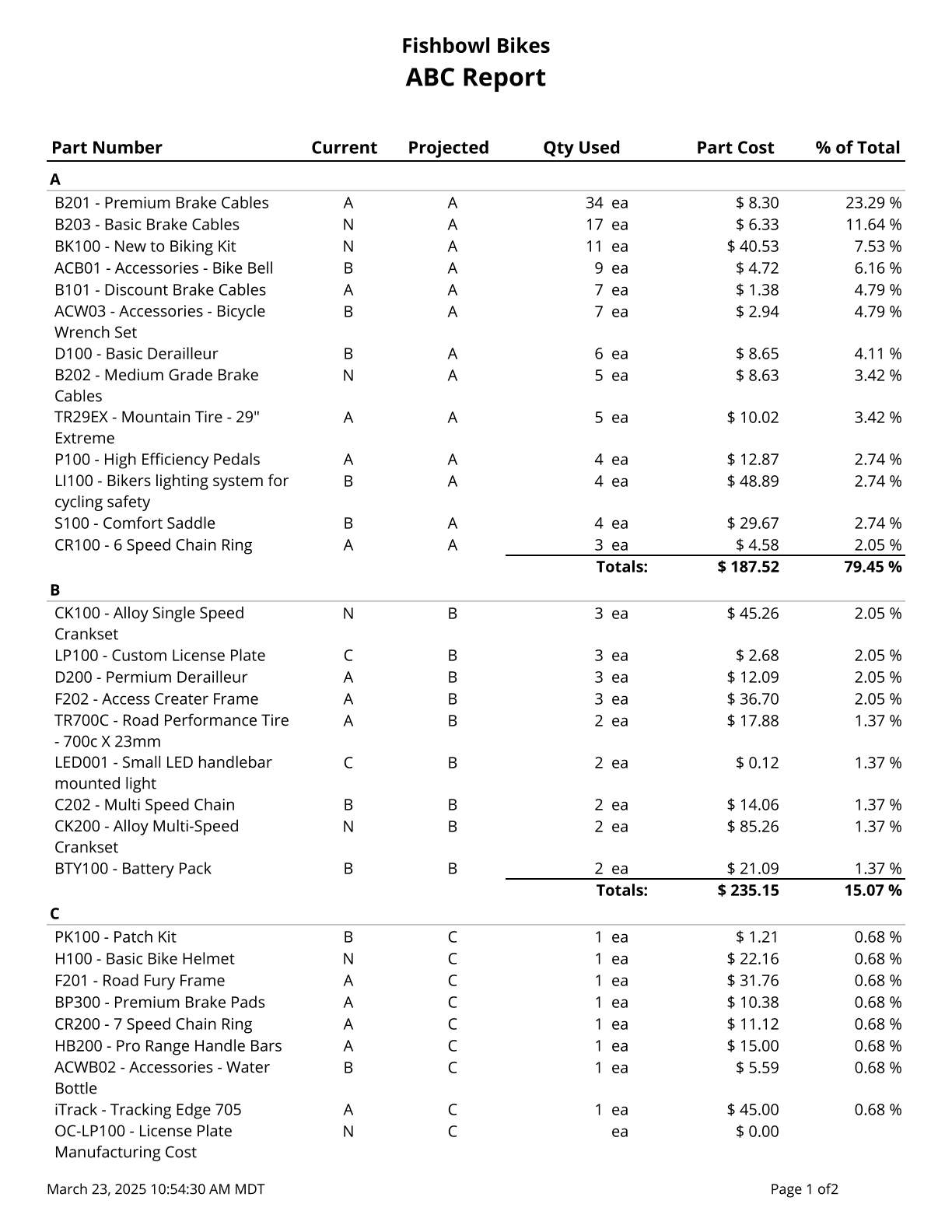
This report prints a list of parts, their current ABC Code, and their Projected ABC Code. Cost values are based on today’s cost. The Qty Used column shows the quantity used in manufacturing and/or sales activity for the given date range.
The  Modify Report button allows the following report filters to be customized:
- OPTIONAL TAB
- Costing Method - Choose the costing method to see costs based on. (Match this with the method the database is using.)
- Date Range - Enter a date range to run the report for. The date range looks at the EventDate on the INVENTORYLOG table in the database, meaning the date the transaction happened. In particular, this report looks for ship (sales) and consume (manufacturing) transactions.
- Use Manufacture Activity - Choose to include/exclude manufacturing activity in the projected ABC code calculation by checking/unchecking this checkbox.
- Use Sales Activity - Choose to include/exclude sales activity in the projected ABC code calculation by checking/unchecking this checkbox.
- Format Report for Exporting - Removes the page breaks and displays the report on one long page for exporting to CSV, Excel, and other formats.
- Show Group Header - Choose to show/hide the group header by checking/unchecking this checkbox.
- Show Time Stamp - Choose to show/hide the time stamp by checking/unchecking this checkbox.
- Show Totals - Choose to show/hide totals by checking/unchecking this checkbox.
- PRINTER TAB - Allows a default printer to be specified for the report in each location group.