Report Transfer Order Summary
From Fishbowl Advanced
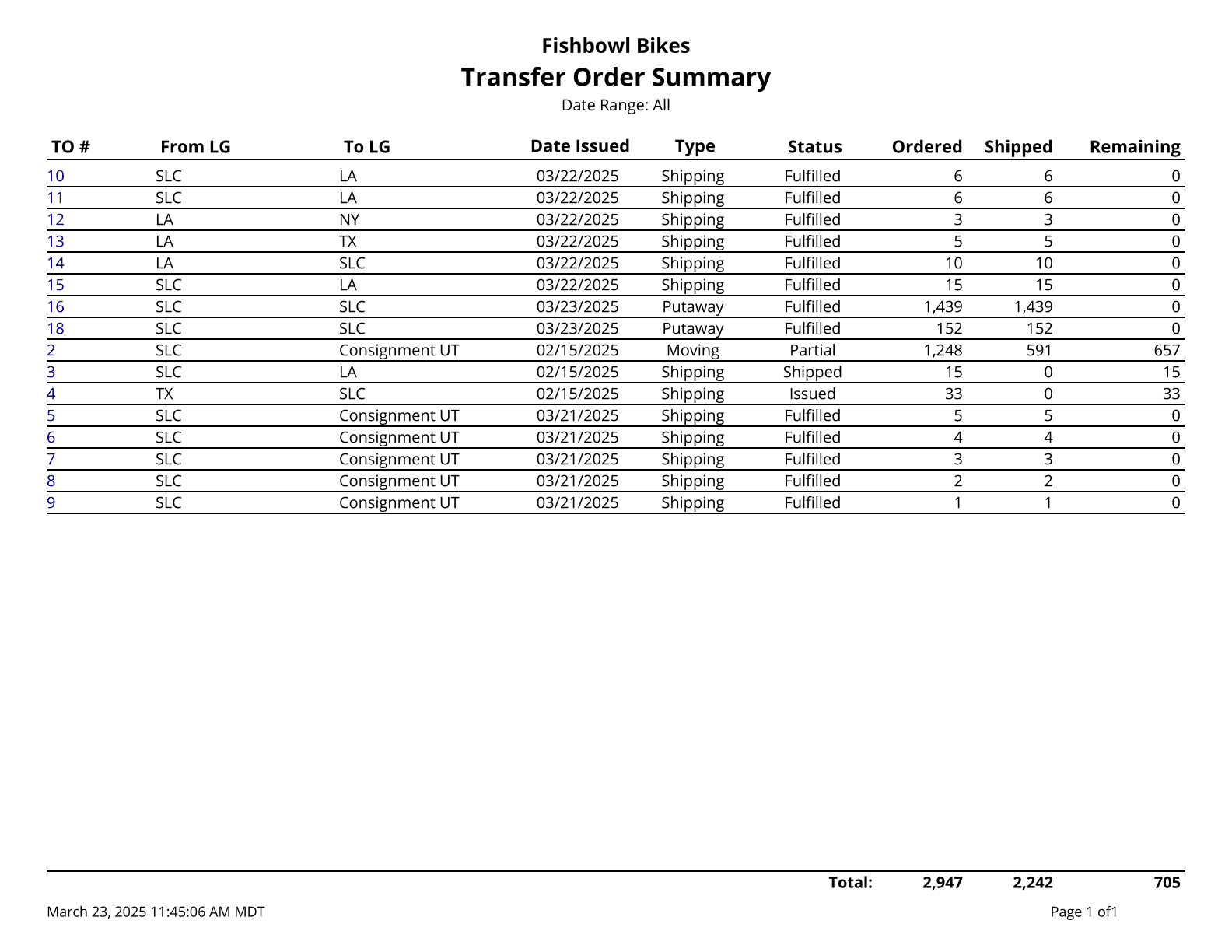
This report prints a summary of transfer orders during the date range given.
The  Modify Report button allows the following report filters to be customized:
- OPTIONAL TAB
- Apply Date Filter To - Choose the date for the date range to look at: Fulfillment Date, Date Created, Date Issued, Date Fulfilled or Date Last Changed.
- Group By - Choose how the report is grouped. Choose by TO Number or by Part Number. (Choosing the Part Number option is only effective with the Show Details checkbox checked.)
- Sort By - Choose how to sort information on the report. Choose by Order Number, by From LG, by To LG, by Date Issued, by Status.
- From Location Group - Choose the location group to see that are listed on orders in the From location group. Leave this field blank to run for all.
- To Location Group - Choose the location group to see that are listed on orders in the To location group. Leave this field blank to run for all.
- Date Range - Choose the date range to see orders for. This correlates with the Apply Date Filter To option above.
- Closed Short - Choose to show/hide orders with this status by checking/unchecking this checkbox.
- Entered - Choose to show/hide orders with this status by checking/unchecking this checkbox.
- Estimate - Choose to show/hide orders with this status by checking/unchecking this checkbox.
- Fulfilled - Choose to show/hide orders with this status by checking/unchecking this checkbox.
- In Progress - Choose to show/hide orders with this status by checking/unchecking this checkbox.
- Issued - Choose to show/hide orders with this status by checking/unchecking this checkbox.
- Partial - Choose to show/hide orders with this status by checking/unchecking this checkbox.
- Picked - Choose to show/hide orders with this status by checking/unchecking this checkbox.
- Picking - Choose to show/hide orders with this status by checking/unchecking this checkbox.
- Request - Choose to show/hide orders with this status by checking/unchecking this checkbox.
- Shipped - Choose to show/hide orders with this status by checking/unchecking this checkbox.
- Voided - Choose to show/hide orders with this status by checking/unchecking this checkbox.
- Format Report for Exporting - Removes the page breaks and displays the report on one long page for exporting to CSV, Excel, and other formats.
- Show Details - Choose to show/hide part or order details by checking/unchecking this checkbox.
- Show Quantity Ordered - Choose to show/hide the quantity ordered by checking/unchecking this checkbox.
- Show Quantity Remaining - Choose to show/hide the quantity remaining by checking/unchecking this checkbox.
- Show Quantity Shipped - Choose to show/hide the quantity shipped by checking/unchecking this checkbox.
- PRINTER TAB - Allows a default printer to be specified for the report in each location group.