Report Work Order Consumption
From Fishbowl Advanced
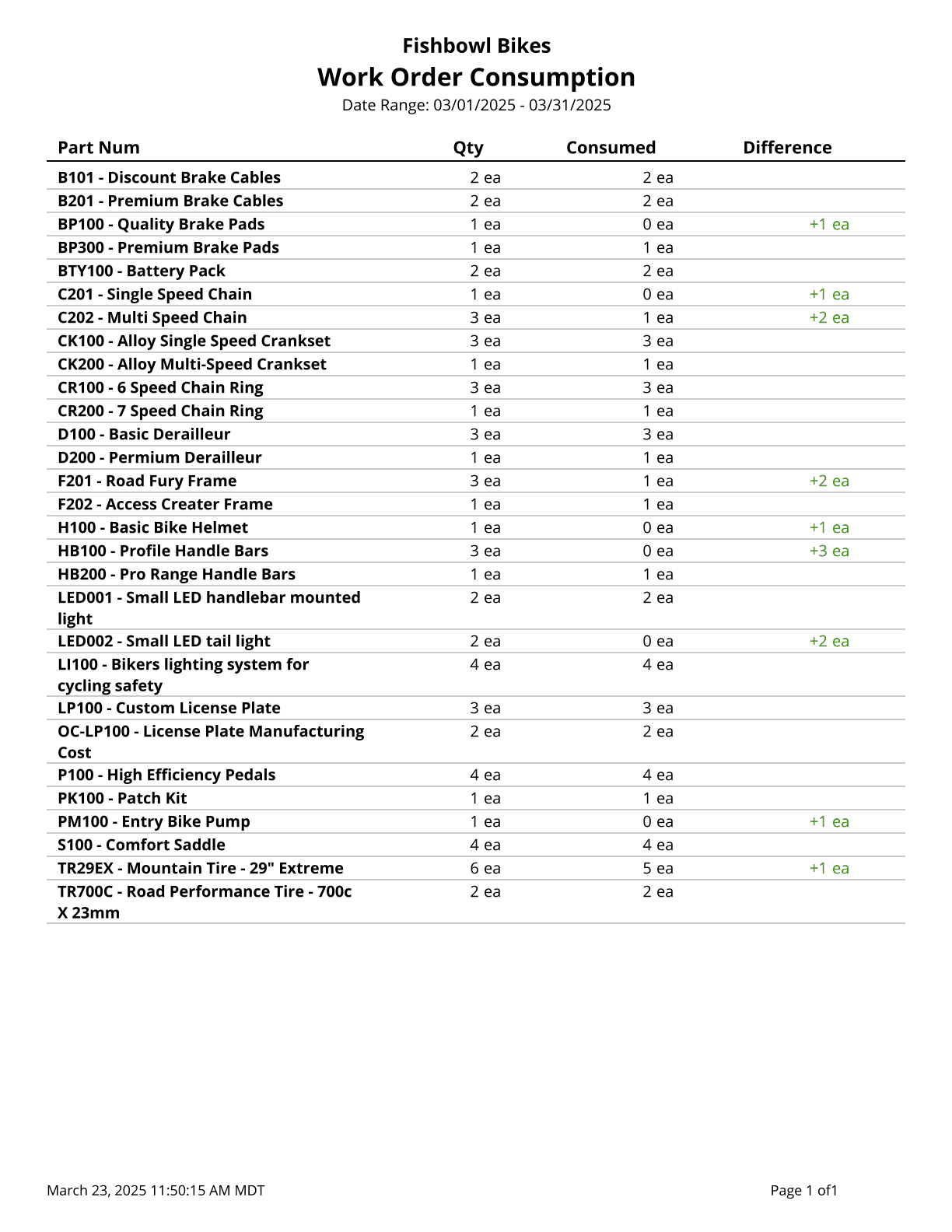
This report generates a list of parts consumed by fulfilled work orders, within a date range.
The  Modify Report button allows the following report filters to be customized:
- OPTIONAL TAB
- Location Group - Choose a location group to view turnover for. Leave this field blank to view data for all location groups.
- WO Number - Enter a WO number to run the report for. Leave this field blank to run for all WOs.
- Part Number - Choose a specific part number to run the report for. Leave this field blank to run for all part numbers.
- Date Range - Choose the date range to pull information for. This date range looks at the DateFinished on the WO table in the database, meaning the date the work order is finished/fulfilled.
- Format Report for Exporting - Removes the page breaks and displays the report on one long page for exporting to CSV, Excel, and other formats.
- Show Details - Choose to show/hide specific WO details by checking/unchecking this checkbox.
- PRINTER TAB - Allows a default printer to be specified for the report in each location group.