Template:Customer
Template page
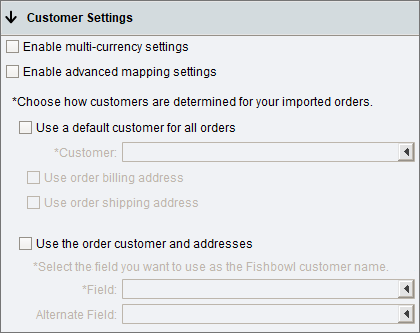
- Use the options below to determine how customers are created in Fishbowl and what information is imported into Fishbowl.
- Enable multi-currency settings - Order prices will be converted from the channel order currency to the Fishbowl currency assigned to the mapped customer. Requires Fishbowl currency conversion to be enabled.
- Enable advanced mapping settings - Opens up additional customer mapping options and control over customer creation.
- Use a default customer for all orders - This option will associate all imported sales orders with the customer selected in the Customer field. This could be used with a generic Fishbowl customer such as {{{1}}} Customer.
- Use order billing address - Use the billing address from the {{{1}}} order instead of the address for the default customer.
- Use order shipping address - Use the shipping address from the {{{1}}} order instead of the address for the default customer.
- Use the order customer and addresses - This option will import the addresses and customer from the {{{1}}} order instead of using a generic customer.
- Field - Select the {{{1}}} field that contains the customer name that should be imported into Fishbowl.
- Alternate Field - An alternate field mapping when the primary mapping does not contain data.
