FAQs: Difference between revisions
No edit summary |
No edit summary |
||
| Line 2: | Line 2: | ||
=ABOUT FISHBOWL= | =ABOUT FISHBOWL= | ||
==What is Fishbowl?== | ==What is Fishbowl?== | ||
Fishbowl is a full-scale, inventory-control software designed for companies that are currently using either QuickBooks or spreadsheets to track their inventory. Fishbowl is an affordable solution that solves many of the problems that only expensive solutions solved in the past. Fishbowl integrates with Intuit’s QuickBooks and is the leading inventory control and manufacturing solution, allowing companies to continue to use the QuickBooks software they already know. In short, Fishbowl provides control over many problems faced by small and medium-sized businesses that are trying to survive in today’s highly competitive business world. | Fishbowl is a full-scale, inventory-control software designed for companies that are currently using either QuickBooks or spreadsheets to track their inventory. Fishbowl is an affordable solution that solves many of the problems that only expensive solutions solved in the past. Fishbowl integrates with Intuit’s QuickBooks and is the leading inventory control and manufacturing solution, allowing companies to continue to use the QuickBooks software they already know. In short, Fishbowl provides control over many problems faced by small and medium-sized businesses that are trying to survive in today’s highly competitive business world. | ||
==What is a module?== | ==What is a module?== | ||
A module is a section of the Fishbowl application. For example, there is a {{Module|Sales Order}}, a {{Module|Purchase Order}}, a {{Module|Shipping}}, and [[Documentation|many more]]. | A module is a section of the Fishbowl application. For example, there is a {{Module|Sales Order}}, a {{Module|Purchase Order}}, a {{Module|Shipping}}, and [[Documentation|many more]]. | ||
==Can Fishbowl create a bill of materials?== | ==Can Fishbowl create a bill of materials?== | ||
The manufacturing edition of Fishbowl has a Bill of Materials feature. This feature provides users with the ability to create custom, basic, or configurable items. The Bill of Materials module works hand in hand with our Manufacturing module, where users may manufacture, disassemble, repair, or service items. For a more information, see {{Module|Bill of Materials}}. | The manufacturing edition of Fishbowl has a Bill of Materials feature. This feature provides users with the ability to create custom, basic, or configurable items. The Bill of Materials module works hand in hand with our Manufacturing module, where users may manufacture, disassemble, repair, or service items. For a more information, see {{Module|Bill of Materials}}. | ||
==Can I run Fishbowl without integrating with QuickBooks?== | ==Can I run Fishbowl without integrating with QuickBooks?== | ||
Yes. You can run Fishbowl as a standalone product. You need to integrate Fishbowl with QuickBooks only if you want to import data from QuickBooks or have Fishbowl send accounting transactions to QuickBooks. | Yes. You can run Fishbowl as a standalone product. You need to integrate Fishbowl with QuickBooks only if you want to import data from QuickBooks or have Fishbowl send accounting transactions to QuickBooks. | ||
==Which functions does Fishbowl take over from QuickBooks?== | ==Which functions does Fishbowl take over from QuickBooks?== | ||
Fishbowl takes over all inventory functions from QuickBooks. Sales and purchase transactions fulfilled in Fishbowl will automatically post "Invoices" and "Vendor Bills," respectively, to QuickBooks. As manual adjustments are made to Fishbowl's inventory levels, any affected accounting data will be exported to update the General Ledger in QuickBooks. | Fishbowl takes over all inventory functions from QuickBooks. Sales and purchase transactions fulfilled in Fishbowl will automatically post "Invoices" and "Vendor Bills," respectively, to QuickBooks. As manual adjustments are made to Fishbowl's inventory levels, any affected accounting data will be exported to update the General Ledger in QuickBooks. | ||
==Is Fishbowl scalable?== | ==Is Fishbowl scalable?== | ||
Fishbowl uses a MySQL database, which is a very fast and efficient database. This means that as your data accumulates and the complexity of your business increases, Fishbowl can grow with you. | Fishbowl uses a MySQL database, which is a very fast and efficient database. This means that as your data accumulates and the complexity of your business increases, Fishbowl can grow with you. | ||
==What is the minimum monitor resolution for Fishbowl?== | ==What is the minimum monitor resolution for Fishbowl?== | ||
A monitor resolution of at least 1920x1080 pixels is recommended when using the Fishbowl Client. The minimum resolution is 1280x960. | A monitor resolution of at least 1920x1080 pixels is recommended when using the Fishbowl Client. The minimum resolution is 1280x960. | ||
==What Fishbowl features would appeal to the independent manufacturer or wholesale/distributor?== | ==What Fishbowl features would appeal to the independent manufacturer or wholesale/distributor?== | ||
Fishbowl provides many features for manufacturers and wholesalers. | Fishbowl provides many features for manufacturers and wholesalers. | ||
| Line 72: | Line 47: | ||
==Does Fishbowl handle multi-currency?== | ==Does Fishbowl handle multi-currency?== | ||
Yes. See the {{Module|Currency}} for more information. | Yes. See the {{Module|Currency}} for more information. | ||
==Can URLs be associated with items in Fishbowl?== | ==Can URLs be associated with items in Fishbowl?== | ||
Yes. Below are the locations of some of the URL fields in Fishbowl. | Yes. Below are the locations of some of the URL fields in Fishbowl. | ||
| Line 90: | Line 63: | ||
==Can part numbers be exported from Fishbowl into QuickBooks?== | ==Can part numbers be exported from Fishbowl into QuickBooks?== | ||
Fishbowl exports items to QuickBooks using the FB_Item code. This allows Fishbowl to store more parts than some versions of QuickBooks. It also allows Fishbowl to use different costing methods (LIFO, FIFO, Standard, etc.) without interfering with the costs that may have been stored in QuickBooks. By default, Fishbowl includes the Item Number and the Item Description in the QuickBooks description field. These can be separated into the separate fields, the Item Code column can be hidden on the report, and additional fields can be added and customized. See [[QuickBooks#Export_Item_Number.2C_Description.2C_and_UOM_to_QuickBooks|Export Item Number, Description, and UOM to QuickBooks]] for more information. | Fishbowl exports items to QuickBooks using the FB_Item code. This allows Fishbowl to store more parts than some versions of QuickBooks. It also allows Fishbowl to use different costing methods (LIFO, FIFO, Standard, etc.) without interfering with the costs that may have been stored in QuickBooks. By default, Fishbowl includes the Item Number and the Item Description in the QuickBooks description field. These can be separated into the separate fields, the Item Code column can be hidden on the report, and additional fields can be added and customized. See [[QuickBooks#Export_Item_Number.2C_Description.2C_and_UOM_to_QuickBooks|Export Item Number, Description, and UOM to QuickBooks]] for more information. | ||
==Is Fishbowl ODBC compliant?== | ==Is Fishbowl ODBC compliant?== | ||
Yes. Fishbowl's database is ODBC compliant and therefore can maintain ODBC connections with other compliant programs such as Crystal Reports, Wasp Bar-coding software, and Microsoft Access. For instructions on how to complete the ODBC setup, see [[Shipping Integration#ODBC setup|ODBC setup]]. | Yes. Fishbowl's database is ODBC compliant and therefore can maintain ODBC connections with other compliant programs such as Crystal Reports, Wasp Bar-coding software, and Microsoft Access. For instructions on how to complete the ODBC setup, see [[Shipping Integration#ODBC setup|ODBC setup]]. | ||
==What is the maximum number of items I can have in Fishbowl?== | ==What is the maximum number of items I can have in Fishbowl?== | ||
Fishbowl has no limit to the amount of inventory items you can manage in your database. However, depending on the amount of parts or data within your Fishbowl database, we do recommend following the [[System_Requirements#Hardware_recommendations|Hardware recommendations]] to ensure the proper speed necessary to run your datafile. | |||
==Supported Fishbowl versions== | |||
{{Supported Fishbowl Versions}} | |||
[[System Requirements}} | |||
==Supported QuickBooks versions== | |||
{{Supported QuickBooks Versions}} | |||
[[System Requirements}} | |||
==Supported Operating Systems (OS)== | |||
{{Supported Operating Systems}} | |||
[[System Requirements}} | |||
==Hardware recommendations== | |||
{{Hardware recommendations}} | |||
[[System Requirements}} | |||
=QUICKBOOKS INTEGRATION= | =QUICKBOOKS INTEGRATION= | ||
==Will somebody help me integrate with QuickBooks?== | ==Will somebody help me integrate with QuickBooks?== | ||
Fishbowl provides step-by-step documentation on the [[QuickBooks#Integration|Integration]] and [https://help.fishbowlinventory.com/s/Training-Videos Training Videos] that will walk you through the process. | Fishbowl provides step-by-step documentation on the [[QuickBooks#Integration|Integration]] and [https://help.fishbowlinventory.com/s/Training-Videos Training Videos] that will walk you through the process. | ||
==Why don't my Fishbowl and QuickBooks reports match up?== | ==Why don't my Fishbowl and QuickBooks reports match up?== | ||
Did the Fishbowl and QuickBooks reports match to begin with? When Fishbowl and QuickBooks were first integrated, were adjustments made to make sure they matched? If you cannot find specific discrepancies, one option is to create a journal entry in QuickBooks to make the reports and accounts match, and then check the transactions made throughout the day to see what is causing the discrepancies. | Did the Fishbowl and QuickBooks reports match to begin with? When Fishbowl and QuickBooks were first integrated, were adjustments made to make sure they matched? If you cannot find specific discrepancies, one option is to create a journal entry in QuickBooks to make the reports and accounts match, and then check the transactions made throughout the day to see what is causing the discrepancies. | ||
=UPDATING FISHBOWL= | =UPDATING FISHBOWL= | ||
==How do I update Fishbowl?== | ==How do I update Fishbowl?== | ||
For complete instructions on updating Fishbowl, see [[Update Fishbowl]]. | For complete instructions on updating Fishbowl, see [[Update Fishbowl]]. | ||
==What is an update?== | ==What is an update?== | ||
An update is an enhancement to an existing installation of Fishbowl. Updates usually include improved features and bug fixes. A complete list of added features and bug fixes can be found in the [[Release Notes]]. For complete instructions on updating Fishbowl, see [[Update Fishbowl]]. | An update is an enhancement to an existing installation of Fishbowl. Updates usually include improved features and bug fixes. A complete list of added features and bug fixes can be found in the [[Release Notes]]. For complete instructions on updating Fishbowl, see [[Update Fishbowl]]. | ||
==How do I know if I need to update?== | ==How do I know if I need to update?== | ||
It is recommended to always use the latest version of Fishbowl. New versions of Fishbowl Advanced are typically released every month. When a new version is released, there will be a [[Update_Fishbowl#Auto_update|notification]] in the top-right corner of Fishbowl. | It is recommended to always use the latest version of Fishbowl. New versions of Fishbowl Advanced are typically released every month. When a new version is released, there will be a [[Update_Fishbowl#Auto_update|notification]] in the top-right corner of Fishbowl. | ||
==How do I update my license key?== | ==How do I update my license key?== | ||
{{Update License Key}} | {{Update License Key}} | ||
==How do I backup my Fishbowl database?== | ==How do I backup my Fishbowl database?== | ||
To automatically create database backups, use the {{Module|Schedule}} to create a scheduled backup of the Fishbowl database. If possible, the backup should be stored on an external hard drive or network location. | To automatically create database backups, use the {{Module|Schedule}} to create a scheduled backup of the Fishbowl database. If possible, the backup should be stored on an external hard drive or network location. | ||
| Line 138: | Line 117: | ||
==How do I restore a backup database?== | ==How do I restore a backup database?== | ||
A Fishbowl database must be restored in its entirety. This means you may not restore or pull only certain orders or bits of information from a backup, but rather must restore all of the data. To restore a backup, you must first be on the Fishbowl Server computer. | A Fishbowl database must be restored in its entirety. This means you may not restore or pull only certain orders or bits of information from a backup, but rather must restore all of the data. To restore a backup, you must first be on the Fishbowl Server computer. | ||
| Line 156: | Line 134: | ||
==How do I move an existing installation?== | ==How do I move an existing installation?== | ||
See [[Install_Fishbowl#Move_an_existing_installation|Move an existing installation]] for instructions regarding moving an existing Fishbowl installation to a new server computer. | See [[Install_Fishbowl#Move_an_existing_installation|Move an existing installation]] for instructions regarding moving an existing Fishbowl installation to a new server computer. | ||
==Can I run multiple Fishbowl Servers simultaneously?== | ==Can I run multiple Fishbowl Servers simultaneously?== | ||
Yes, see [[Install_Fishbowl#Running_multiple_Fishbowl_Servers|Running multiple Fishbowl Servers]] and [[Sandbox]]. | Yes, see [[Install_Fishbowl#Running_multiple_Fishbowl_Servers|Running multiple Fishbowl Servers]] and [[Sandbox]]. | ||
==How do I change my license key?== | ==How do I change my license key?== | ||
For instructions on changing the Fishbowl license key, see [[Start Fishbowl#Change license key after Fishbowl is installed|Change license key]]. | For instructions on changing the Fishbowl license key, see [[Start Fishbowl#Change license key after Fishbowl is installed|Change license key]]. | ||
==How do I get a service contract?== | ==How do I get a service contract?== | ||
Your Customer Service representative will be able to assist you with purchasing a new Service Contract. If you do not know who your Customer Service Representative is, please don't hesitate to contact our team at {{email|support}}, or call 1-800-774-7085 ext 7 for assistance. | Your Customer Service representative will be able to assist you with purchasing a new Service Contract. If you do not know who your Customer Service Representative is, please don't hesitate to contact our team at {{email|support}}, or call 1-800-774-7085 ext 7 for assistance. | ||
==How do I know what version of Fishbowl I have?== | ==How do I know what version of Fishbowl I have?== | ||
In the Fishbowl Client, click the '''Help''' menu and then select '''Check Version'''. You will be notified if you are on the current version or if there is a new update available to download. | In the Fishbowl Client, click the '''Help''' menu and then select '''Check Version'''. You will be notified if you are on the current version or if there is a new update available to download. | ||
| Line 178: | Line 151: | ||
==Can I undo an update?== | ==Can I undo an update?== | ||
To return to a previous version of Fishbowl, uninstall the updated version and re-install the previous version. You will need to restore a copy of your old database version that was taken before the update. Any data that was entered into the new version will be lost when you return to the previous version. | To return to a previous version of Fishbowl, uninstall the updated version and re-install the previous version. You will need to restore a copy of your old database version that was taken before the update. Any data that was entered into the new version will be lost when you return to the previous version. | ||
| Line 184: | Line 156: | ||
==Who do I contact if I have difficulties or more questions?== | ==Who do I contact if I have difficulties or more questions?== | ||
For contact options, please see [https://help.fishbowlinventory.com]. | |||
For | |||
=GENERAL QUESTIONS= | =GENERAL QUESTIONS= | ||
==What is the difference between a part and a product?== | ==What is the difference between a part and a product?== | ||
A [[part]] is '''purchased''' from a vendor or manufactured. | A [[part]] is '''purchased''' from a vendor or manufactured. | ||
| Line 209: | Line 173: | ||
==What is the difference between a Location and a Location Group?== | ==What is the difference between a Location and a Location Group?== | ||
A [[Location]] is a physical place where inventory items are stored. Examples include stock rooms, sales floors, shelves, loading docks, etc. | A [[Location]] is a physical place where inventory items are stored. Examples include stock rooms, sales floors, shelves, loading docks, etc. | ||
| Line 215: | Line 178: | ||
==How do I know what will be included in the next Fishbowl Release?== | ==How do I know what will be included in the next Fishbowl Release?== | ||
Fishbowl has a [[Release Notes]] page that includes all of new features and fixes for all versions of Fishbowl, including the upcoming release. | Fishbowl has a [[Release Notes]] page that includes all of new features and fixes for all versions of Fishbowl, including the upcoming release. | ||
==Why are my parts not showing up in the Inventory module?== | ==Why are my parts not showing up in the Inventory module?== | ||
If your items are in the Part module, but they are not showing up in the Inventory module, the part may not have any inventory in stock, or it may be a non-inventory type item. To show items that are not in stock, use the [[Inventory#Search|Advanced Search]]. | If your items are in the Part module, but they are not showing up in the Inventory module, the part may not have any inventory in stock, or it may be a non-inventory type item. To show items that are not in stock, use the [[Inventory#Search|Advanced Search]]. | ||
| Line 225: | Line 186: | ||
==How does the search within Fishbowl work?== | ==How does the search within Fishbowl work?== | ||
Nearly all modules in Fishbowl have a search pane to the left that allows you to search that module. Clicking the '''Advanced Search''' button in the search pane will allow much more customization of the search. Fishbowl also offers a wildcard search by using the '''%''' symbol as a wildcard for any number of characters. For example, '''dental%bib''' would return '''Dental Large Bib''' and '''Dental Small Bib'''. | Nearly all modules in Fishbowl have a search pane to the left that allows you to search that module. Clicking the '''Advanced Search''' button in the search pane will allow much more customization of the search. Fishbowl also offers a wildcard search by using the '''%''' symbol as a wildcard for any number of characters. For example, '''dental%bib''' would return '''Dental Large Bib''' and '''Dental Small Bib'''. | ||
==What types of costing methods does Fishbowl handle?== | ==What types of costing methods does Fishbowl handle?== | ||
For a description of each type of costing method, please see [[Accounting_Integration#Module_Options_Costing_tab|Costing methods]]. | For a description of each type of costing method, please see [[Accounting_Integration#Module_Options_Costing_tab|Costing methods]]. | ||
==Why can't I see all of the modules in Fishbowl?== | ==Why can't I see all of the modules in Fishbowl?== | ||
A user will only see a module if they have the appropriate [[Access Rights]] for that module. See [[User Group#Assign access rights to a user|Assign access rights to a user]] for instructions on modifying a user's access rights. | A user will only see a module if they have the appropriate [[Access Rights]] for that module. See [[User Group#Assign access rights to a user|Assign access rights to a user]] for instructions on modifying a user's access rights. | ||
==Why does Fishbowl export all items over to QuickBooks as FB_Item? Can this be changed?== | ==Why does Fishbowl export all items over to QuickBooks as FB_Item? Can this be changed?== | ||
Fishbowl exports items to QuickBooks using the FB_Item code. This allows Fishbowl to store more parts than some versions of QuickBooks. It also allows Fishbowl to use different costing methods (LIFO, FIFO, Standard, etc.) without interfering with the costs that may have been stored in QuickBooks. By default, Fishbowl includes the Item Number and the Item Description in the QuickBooks description field. These can be separated into the separate fields, the Item Code column can be hidden on the report, and additional fields can be added and customized. See [[QuickBooks#Export_Item_Number.2C_Description.2C_and_UOM_to_QuickBooks|Export Item Number, Description, and UOM to QuickBooks]] for more information. | Fishbowl exports items to QuickBooks using the FB_Item code. This allows Fishbowl to store more parts than some versions of QuickBooks. It also allows Fishbowl to use different costing methods (LIFO, FIFO, Standard, etc.) without interfering with the costs that may have been stored in QuickBooks. By default, Fishbowl includes the Item Number and the Item Description in the QuickBooks description field. These can be separated into the separate fields, the Item Code column can be hidden on the report, and additional fields can be added and customized. See [[QuickBooks#Export_Item_Number.2C_Description.2C_and_UOM_to_QuickBooks|Export Item Number, Description, and UOM to QuickBooks]] for more information. | ||
==We are integrating Fishbowl and QuickBooks for the first time. What do we need to do or know beforehand?== | ==We are integrating Fishbowl and QuickBooks for the first time. What do we need to do or know beforehand?== | ||
The following links will address the process of preparing for the integration, and the steps required to integrate with QuickBooks. | The following links will address the process of preparing for the integration, and the steps required to integrate with QuickBooks. | ||
| Line 248: | Line 204: | ||
==Does Fishbowl print barcodes?== | ==Does Fishbowl print barcodes?== | ||
Yes! Fishbowl can print barcodes for parts, products, locations, tracking, and more. Most reports will pull information directly from the data that is stored in Fishbowl. For example, a part barcode report will print barcodes using Fishbowl part numbers, so there is no need to enter any additional information. Follow the steps below to print barcodes from Fishbowl. | Yes! Fishbowl can print barcodes for parts, products, locations, tracking, and more. Most reports will pull information directly from the data that is stored in Fishbowl. For example, a part barcode report will print barcodes using Fishbowl part numbers, so there is no need to enter any additional information. Follow the steps below to print barcodes from Fishbowl. | ||
| Line 265: | Line 220: | ||
==Why are only the first 90 barcodes printing?== | ==Why are only the first 90 barcodes printing?== | ||
Some barcode reports in Fishbowl may default to printing only 90 barcodes. To view past the first 90 labels, click the {{Button|Modify Report}} and increase the count. If you run into problems with the report timing out, you may need to enter a value in the '''Skip''' or '''Start at Label''' box and view the report in sections. For example, if you enter 100 in the count field and 50 in the skip field, the report will load labels 50-150. | Some barcode reports in Fishbowl may default to printing only 90 barcodes. To view past the first 90 labels, click the {{Button|Modify Report}} and increase the count. If you run into problems with the report timing out, you may need to enter a value in the '''Skip''' or '''Start at Label''' box and view the report in sections. For example, if you enter 100 in the count field and 50 in the skip field, the report will load labels 50-150. | ||
| Line 271: | Line 225: | ||
==How do I switch Servers for my Fishbowl database?== | ==How do I switch Servers for my Fishbowl database?== | ||
The following instructions will be helpful when you are moving your Fishbowl database to a different server. | The following instructions will be helpful when you are moving your Fishbowl database to a different server. | ||
| Line 284: | Line 237: | ||
==How do I increase the amount of memory or RAM allocated to Fishbowl?== | ==How do I increase the amount of memory or RAM allocated to Fishbowl?== | ||
Based on the amount of memory that is available on each computer, the Fishbowl installer will automatically estimate the ideal amount of memory to allocate to Fishbowl. If necessary, the amount of memory can be manually adjusted during or after installation. See [[Support#Adjust_memory_allocation|Adjust memory allocation]] for instructions on adjusting the memory allocated to Fishbowl. | Based on the amount of memory that is available on each computer, the Fishbowl installer will automatically estimate the ideal amount of memory to allocate to Fishbowl. If necessary, the amount of memory can be manually adjusted during or after installation. See [[Support#Adjust_memory_allocation|Adjust memory allocation]] for instructions on adjusting the memory allocated to Fishbowl. | ||
==How can I find where all of the Fishbowl Module Options are and what they do?== | ==How can I find where all of the Fishbowl Module Options are and what they do?== | ||
Within most of the Fishbowl Modules, there are customizable options called "Module Options". They can be found within each module by going to '''Tools | Module Options''' on the Toolbar. Module Option documentation is found in the individual article for each module. To see a complete list of all the Module Options and their functions, please see [[Module Options]]. | Within most of the Fishbowl Modules, there are customizable options called "Module Options". They can be found within each module by going to '''Tools | Module Options''' on the Toolbar. Module Option documentation is found in the individual article for each module. To see a complete list of all the Module Options and their functions, please see [[Module Options]]. | ||
==Where can I find the Fishbowl Training Videos?== | ==Where can I find the Fishbowl Training Videos?== | ||
Brief step-by-step training videos covering many aspects of Fishbowl can be found on the [https://help.fishbowlinventory.com/s/Training-Videos Training Videos] page. | Brief step-by-step training videos covering many aspects of Fishbowl can be found on the [https://help.fishbowlinventory.com/s/Training-Videos Training Videos] page. | ||
==Where can I find an initial Implementation Checklist?== | ==Where can I find an initial Implementation Checklist?== | ||
See [[Implementation Checklist]] for a checklist guide to implementation. | See [[Implementation Checklist]] for a checklist guide to implementation. | ||
=iReport= | =iReport= | ||
==What is iReport?== | ==What is iReport?== | ||
iReport is a powerful and intuitive visual report builder/designer for JasperReports written in Java. This tool allows users to visually edit complex reports with charts, images, and sub reports. iReport is integrated with the leading open-source chart libraries for Java. | iReport is a powerful and intuitive visual report builder/designer for JasperReports written in Java. This tool allows users to visually edit complex reports with charts, images, and sub reports. iReport is integrated with the leading open-source chart libraries for Java. | ||
==Does iReport require additional costs?== | ==Does iReport require additional costs?== | ||
iReport is a free, open-source program that is, depending on your install options, included in the install of Fishbowl. When installing, you have the option to choose an Advanced Install, and from there may check to install iReport. If you did not initially install iReport but wish to have it at a future time you may search for iReport online and download it for free. | iReport is a free, open-source program that is, depending on your install options, included in the install of Fishbowl. When installing, you have the option to choose an Advanced Install, and from there may check to install iReport. If you did not initially install iReport but wish to have it at a future time you may search for iReport online and download it for free. | ||
==How do I integrate Fishbowl and iReport?== | ==How do I integrate Fishbowl and iReport?== | ||
iReport comes bundled with Fishbowl and can be easily integrated when the Data source is pointed to the current database and the Classpaths are set up correctly. For help on how to correctly set up iReport to work with Fishbowl, please see [[iReport]]. | iReport comes bundled with Fishbowl and can be easily integrated when the Data source is pointed to the current database and the Classpaths are set up correctly. For help on how to correctly set up iReport to work with Fishbowl, please see [[iReport]]. | ||
==How do I set up iReport?== | ==How do I set up iReport?== | ||
Please see [[iReport]] for a step-by-step tutorial. | Please see [[iReport]] for a step-by-step tutorial. | ||
==How can I use iReport to make minor Report modifications?== | ==How can I use iReport to make minor Report modifications?== | ||
Fishbowl uses a program called iReport to create reports. iReport can either be installed during the Fishbowl install or afterward. Fishbowl's partners can create new custom reports or modify existing reports for a fee. Tech-savvy customers can also make report modifications themselves. Due to the fact that iReport is a third party software, Fishbowl does ''not'' offer support for iReport, but some helpful information can be found in the [[iReport]] article. | Fishbowl uses a program called iReport to create reports. iReport can either be installed during the Fishbowl install or afterward. Fishbowl's partners can create new custom reports or modify existing reports for a fee. Tech-savvy customers can also make report modifications themselves. Due to the fact that iReport is a third party software, Fishbowl does ''not'' offer support for iReport, but some helpful information can be found in the [[iReport]] article. | ||
==How do I use iReport for Custom Reports?== | ==How do I use iReport for Custom Reports?== | ||
Fishbowl allows you to use iReport to build your own custom reports. Please see [[IReport#Using_iReport_for_Custom_Reports|Using iReport for Custom Reports]] for more details on how this is performed. | Fishbowl allows you to use iReport to build your own custom reports. Please see [[IReport#Using_iReport_for_Custom_Reports|Using iReport for Custom Reports]] for more details on how this is performed. | ||
==Is iReport similar to Crystal Reports?== | ==Is iReport similar to Crystal Reports?== | ||
iReport is very similar to Crystal Reports. If you are already skilled in using Crystal Reports then iReport will be easy to learn. Fishbowl can also be integrated to write reports with Crystal Reports and Microsoft Access through the [[Shipping Integration#ODBC setup|ODBC connection]]. | iReport is very similar to Crystal Reports. If you are already skilled in using Crystal Reports then iReport will be easy to learn. Fishbowl can also be integrated to write reports with Crystal Reports and Microsoft Access through the [[Shipping Integration#ODBC setup|ODBC connection]]. | ||
==What knowledge do I need to use iReport?== | ==What knowledge do I need to use iReport?== | ||
To successfully use iReport you will need a working knowledge of databases and SQL. Java is also used in iReport for advanced functionality. | To successfully use iReport you will need a working knowledge of databases and SQL. Java is also used in iReport for advanced functionality. | ||
==Can I pay Fishbowl to write a report for me?== | ==Can I pay Fishbowl to write a report for me?== | ||
Yes. Click the {{Button|Request}} in the {{Module|Reports}}, or email {{email|reports}} for additional questions. | Yes. Click the {{Button|Request}} in the {{Module|Reports}}, or email {{email|reports}} for additional questions. | ||
Revision as of 13:06, 10 March 2023
Below is a list of some of the most frequently asked questions about Fishbowl.
ABOUT FISHBOWL
What is Fishbowl?
Fishbowl is a full-scale, inventory-control software designed for companies that are currently using either QuickBooks or spreadsheets to track their inventory. Fishbowl is an affordable solution that solves many of the problems that only expensive solutions solved in the past. Fishbowl integrates with Intuit’s QuickBooks and is the leading inventory control and manufacturing solution, allowing companies to continue to use the QuickBooks software they already know. In short, Fishbowl provides control over many problems faced by small and medium-sized businesses that are trying to survive in today’s highly competitive business world.
What is a module?
A module is a section of the Fishbowl application. For example, there is a  Sales Order module, a
 Purchase Order module, a
 Shipping module, and many more.
Can Fishbowl create a bill of materials?
The manufacturing edition of Fishbowl has a Bill of Materials feature. This feature provides users with the ability to create custom, basic, or configurable items. The Bill of Materials module works hand in hand with our Manufacturing module, where users may manufacture, disassemble, repair, or service items. For a more information, see  Bill of Materials module.
Can I run Fishbowl without integrating with QuickBooks?
Yes. You can run Fishbowl as a standalone product. You need to integrate Fishbowl with QuickBooks only if you want to import data from QuickBooks or have Fishbowl send accounting transactions to QuickBooks.
Which functions does Fishbowl take over from QuickBooks?
Fishbowl takes over all inventory functions from QuickBooks. Sales and purchase transactions fulfilled in Fishbowl will automatically post "Invoices" and "Vendor Bills," respectively, to QuickBooks. As manual adjustments are made to Fishbowl's inventory levels, any affected accounting data will be exported to update the General Ledger in QuickBooks.
Is Fishbowl scalable?
Fishbowl uses a MySQL database, which is a very fast and efficient database. This means that as your data accumulates and the complexity of your business increases, Fishbowl can grow with you.
What is the minimum monitor resolution for Fishbowl?
A monitor resolution of at least 1920x1080 pixels is recommended when using the Fishbowl Client. The minimum resolution is 1280x960.
What Fishbowl features would appeal to the independent manufacturer or wholesale/distributor?
Fishbowl provides many features for manufacturers and wholesalers.
- Multiple warehousing
- Specific inventory locations
- Lot, revision, expiration date, and serial number tracking
- Auto-purchasing for re-order points and backordered parts
- Outsourcing
- Dropshipping
- Consignment management
- RMA Tracking
- Flexible pricing levels
- Landed Costs and Purchase Order Reconciliation
- LIFO, FIFO, Standard and Average Costing accounting methods
- Pick lists, packing slips
- Finished goods possessing Bills-of-Materials
- Work Order generation for manufacturing, repair, and disassembly
- Staging with work orders
- Auto-Work orders for staying up to designated levels and sub-assemblies
- Basic Point-of-Sale capability
- Extensive Reporting
- and much more
Does Fishbowl handle multi-currency?
Yes. See the  Currency module for more information.
Can URLs be associated with items in Fishbowl?
Yes. Below are the locations of some of the URL fields in Fishbowl.
- General tab of the
 Part module
- General tab of the
 Product module
- Account Info tab of the
 Vendor module
- Account Info tab of the
 Customer module
- Details tab of the Sales Order module
- Details tab of the Purchase Order module
- General tab of the Bill of Materials module
The URL can be a link to a local file, a network location, or a location on the internet.
Can part numbers be exported from Fishbowl into QuickBooks?
Fishbowl exports items to QuickBooks using the FB_Item code. This allows Fishbowl to store more parts than some versions of QuickBooks. It also allows Fishbowl to use different costing methods (LIFO, FIFO, Standard, etc.) without interfering with the costs that may have been stored in QuickBooks. By default, Fishbowl includes the Item Number and the Item Description in the QuickBooks description field. These can be separated into the separate fields, the Item Code column can be hidden on the report, and additional fields can be added and customized. See Export Item Number, Description, and UOM to QuickBooks for more information.
Is Fishbowl ODBC compliant?
Yes. Fishbowl's database is ODBC compliant and therefore can maintain ODBC connections with other compliant programs such as Crystal Reports, Wasp Bar-coding software, and Microsoft Access. For instructions on how to complete the ODBC setup, see ODBC setup.
What is the maximum number of items I can have in Fishbowl?
Fishbowl has no limit to the amount of inventory items you can manage in your database. However, depending on the amount of parts or data within your Fishbowl database, we do recommend following the Hardware recommendations to ensure the proper speed necessary to run your datafile.
Supported Fishbowl versions
Template:Supported Fishbowl Versions [[System Requirements}}
Supported QuickBooks versions
Template:Supported QuickBooks Versions [[System Requirements}}
Supported Operating Systems (OS)
Template:Supported Operating Systems [[System Requirements}}
Hardware recommendations
| Small Database |
|---|
| Orders per day - 0-100 |
| Fishbowl Server - 2.3 GHz CPU and 12 GB RAM |
| Fishbowl Client - 2.3 GHz CPU and 8 GB RAM |
| Medium Database |
|---|
| Orders per day - 100-1,000 |
| Fishbowl Server - 3.4 GHz CPU and 16 GB RAM |
| Fishbowl Client - 3 GHz CPU and 8 GB RAM |
| Large Database |
|---|
| Orders per day - 1,000+ |
| Fishbowl Server - 4 GHz CPU and 32 GB RAM |
| Fishbowl Client - 3.4 GHz CPU and 16 GB RAM |
| Additional requirements and recommendations |
|---|
| Internet speed - At least 100 Mbps upload and download (1,000 is recommended) |
| Screen resolution - 1920 x 1080 pixels |
| MySQL database - Fishbowl supports MySQL 5.7 and MySQL 8. |
[[System Requirements}}
QUICKBOOKS INTEGRATION
Will somebody help me integrate with QuickBooks?
Fishbowl provides step-by-step documentation on the Integration and Training Videos that will walk you through the process.
Why don't my Fishbowl and QuickBooks reports match up?
Did the Fishbowl and QuickBooks reports match to begin with? When Fishbowl and QuickBooks were first integrated, were adjustments made to make sure they matched? If you cannot find specific discrepancies, one option is to create a journal entry in QuickBooks to make the reports and accounts match, and then check the transactions made throughout the day to see what is causing the discrepancies.
UPDATING FISHBOWL
How do I update Fishbowl?
For complete instructions on updating Fishbowl, see Update Fishbowl.
What is an update?
An update is an enhancement to an existing installation of Fishbowl. Updates usually include improved features and bug fixes. A complete list of added features and bug fixes can be found in the Release Notes. For complete instructions on updating Fishbowl, see Update Fishbowl.
How do I know if I need to update?
It is recommended to always use the latest version of Fishbowl. New versions of Fishbowl Advanced are typically released every month. When a new version is released, there will be a notification in the top-right corner of Fishbowl.
How do I update my license key?
Throughout the year, Fishbowl releases several minor updates called point releases (for example, Fishbowl 2026.1, Fishbowl 2026.2, etc.). Point releases do not require an updated license key.
Once a year, a major version of Fishbowl is released for the upcoming year (for example, Fishbowl 2027). In order to update to the latest major version, Fishbowl users must have a current support contract, which will allow the license key to be updated automatically.
How do I backup my Fishbowl database?
To automatically create database backups, use the  Schedule module to create a scheduled backup of the Fishbowl database. If possible, the backup should be stored on an external hard drive or network location.
- To manually create a backup, right-click the Fishbowl Server icon in the system tray and select Options.

- Right-click the database and select Backup Database

- The backup file will be saved in the Fishbowl\data\backups folder. For example, C:\Program Files\Fishbowl\data\backups


How do I restore a backup database?
A Fishbowl database must be restored in its entirety. This means you may not restore or pull only certain orders or bits of information from a backup, but rather must restore all of the data. To restore a backup, you must first be on the Fishbowl Server computer.
- On the server computer, double-click the Fishbowl Server icon in the system tray and then click the Stop button.

- When the server is fully stopped, the Server Status window will automatically close.

- Click the Tools menu and select Options.

- Click the Restore tab and then click the
 Find File button.
If the Find File button is disabled, close the window to make sure the Fishbowl Server is fully stopped and then try again.
- Browse to the location of the backup file, select the file, and then click Open.

- In the Database field, the name of database can be changed.
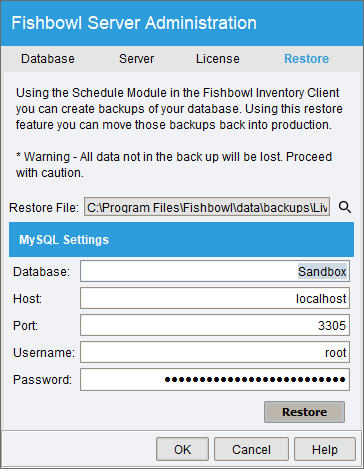
- Click the Restore button and then click Yes to confirm that the process may take a few minutes.

- Once the database has been created, click OK in the confirmation window.

- Click the Database tab and make sure the new database is selected and then click OK.

- After you get a message that the database has been changed to the new database, click OK.

- Click the Start button.

- When the server is fully started, the Server Status window will automatically close.

- Close the Fishbowl Server window.


How do I move an existing installation?
See Move an existing installation for instructions regarding moving an existing Fishbowl installation to a new server computer.
Can I run multiple Fishbowl Servers simultaneously?
Yes, see Running multiple Fishbowl Servers and Sandbox.
How do I change my license key?
For instructions on changing the Fishbowl license key, see Change license key.
How do I get a service contract?
Your Customer Service representative will be able to assist you with purchasing a new Service Contract. If you do not know who your Customer Service Representative is, please don't hesitate to contact our team at support@fishbowlinventory.com, or call 1-800-774-7085 ext 7 for assistance.
How do I know what version of Fishbowl I have?
In the Fishbowl Client, click the Help menu and then select Check Version. You will be notified if you are on the current version or if there is a new update available to download.
Another way of verifying your Fishbowl version is by right clicking on the Fishbowl Server running in the lower right corner of your server computer and choosing Show. The version being run will show next to Version.
Can I undo an update?
To return to a previous version of Fishbowl, uninstall the updated version and re-install the previous version. You will need to restore a copy of your old database version that was taken before the update. Any data that was entered into the new version will be lost when you return to the previous version.
WARNING: In some cases a Fishbowl update will make changes to the database that cannot be reversed. Making a backup copy of the database before an update is highly recommended so that the database can be restored to a previous state if necessary.
Who do I contact if I have difficulties or more questions?
For contact options, please see [1].
GENERAL QUESTIONS
What is the difference between a part and a product?
A part is purchased from a vendor or manufactured.
A product is sold to customers.
A part could be a single item purchased for resale, or a component used to manufacture an item for resale. Consider the following bicycle business:
- Some customers purchase individual items, such as wheels, spokes, seats, brakes, handlebars, etc. When you buy these items from a vendor, you are purchasing parts. When you sell the items, you are selling products.
- Some customers prefer to purchase completely assembled bicycles. In this case, the individual components that you purchase to build the bicycle are the parts, and the bicycle you sell to a customer is the product. You buy parts, and you sell products.
More than one product can be associated with a part, or if a part is never sold, it need not have a product association.
What is the difference between a Location and a Location Group?
A Location is a physical place where inventory items are stored. Examples include stock rooms, sales floors, shelves, loading docks, etc.
A Location Group is a collection of Locations. Examples include an entire warehouse, site, city, etc.
How do I know what will be included in the next Fishbowl Release?
Fishbowl has a Release Notes page that includes all of new features and fixes for all versions of Fishbowl, including the upcoming release.
Why are my parts not showing up in the Inventory module?
If your items are in the Part module, but they are not showing up in the Inventory module, the part may not have any inventory in stock, or it may be a non-inventory type item. To show items that are not in stock, use the Advanced Search.
To add inventory for a part that does not currently have inventory, click the  Add button or the
 Cycle button in the module toolbar of the Inventory module. A wizard will be displayed to take you through the process of adding inventory. See Add inventory and Cycle count for more information.
How does the search within Fishbowl work?
Nearly all modules in Fishbowl have a search pane to the left that allows you to search that module. Clicking the Advanced Search button in the search pane will allow much more customization of the search. Fishbowl also offers a wildcard search by using the % symbol as a wildcard for any number of characters. For example, dental%bib would return Dental Large Bib and Dental Small Bib.
What types of costing methods does Fishbowl handle?
For a description of each type of costing method, please see Costing methods.
Why can't I see all of the modules in Fishbowl?
A user will only see a module if they have the appropriate Access Rights for that module. See Assign access rights to a user for instructions on modifying a user's access rights.
Why does Fishbowl export all items over to QuickBooks as FB_Item? Can this be changed?
Fishbowl exports items to QuickBooks using the FB_Item code. This allows Fishbowl to store more parts than some versions of QuickBooks. It also allows Fishbowl to use different costing methods (LIFO, FIFO, Standard, etc.) without interfering with the costs that may have been stored in QuickBooks. By default, Fishbowl includes the Item Number and the Item Description in the QuickBooks description field. These can be separated into the separate fields, the Item Code column can be hidden on the report, and additional fields can be added and customized. See Export Item Number, Description, and UOM to QuickBooks for more information.
We are integrating Fishbowl and QuickBooks for the first time. What do we need to do or know beforehand?
The following links will address the process of preparing for the integration, and the steps required to integrate with QuickBooks.
- What should you know before integrating QuickBooks and Fishbowl?
- Getting Started - Integrate an accounting system
Does Fishbowl print barcodes?
Yes! Fishbowl can print barcodes for parts, products, locations, tracking, and more. Most reports will pull information directly from the data that is stored in Fishbowl. For example, a part barcode report will print barcodes using Fishbowl part numbers, so there is no need to enter any additional information. Follow the steps below to print barcodes from Fishbowl.
- Open the
 Reports module, located in the
 General group, and double-click the Labels folder in the search pane.

- For a description of all available barcode reports, a list of report options, and an image of the report output, see Label Reports.
- Double-click a report and then click the
 Modify Report button to check that the report options are set correctly.
- Once the report is displaying the correct information, click the Print button to print the barcodes.

Additional Information
- Some reports are designed to print multiple barcodes on a sheet, while other reports will print individual barcodes.
- For instructions on printing more than 90 labels, click here.
- A USB barcode scanner can be used to input data into Fishbowl, just like a keyboard. For example, to add a product to a sales order, place the cursor in the Product field, and then scan the product barcode.
- Fishbowl Checkout, Fishbowl Advanced Mobile, and Fishbowl Advanced Mobile are also barcode compatible.
- Custom barcode reports can also be requested or created using iReport.
Why are only the first 90 barcodes printing?
Some barcode reports in Fishbowl may default to printing only 90 barcodes. To view past the first 90 labels, click the  Modify Report button and increase the count. If you run into problems with the report timing out, you may need to enter a value in the Skip or Start at Label box and view the report in sections. For example, if you enter 100 in the count field and 50 in the skip field, the report will load labels 50-150.

How do I switch Servers for my Fishbowl database?
The following instructions will be helpful when you are moving your Fishbowl database to a different server.
- Make a backup of your database folder. If your Fishbowl is installed in the default location you can your database file here: C:\Program Files\Fishbowl
- If you have images in Fishbowl, copy the entire database folder.
- If you have custom reports you will also want to copy the reports folder located (default) in C:\Program Files\Fishbowl\Server
- If you do not have images or custom reports and simply want to copy your current database, go to C:\Program Files\Fishbowl\Server\database\data. If your database is internal and was installed to the default directory it will be located in the data folder. Your database will likely be the largest and will have the most recent date. If you are still not sure which database is yours you can find out by right clicking on the Fishbowl Server icon in your system tray and go up to Show. The Database line will show your company name and datafile that Fishbowl is connected to. For example, in the following screen shot you will notice that Bicycles Unlimited is the company name and EXAMPLE.FDB is the name of the database.
- Copy the files to a device where you can access them from your new computer, for example, a network drive, a flash drive, a burnable disc, etc.
- Install the full version of Fishbowl on the new server computer
- You are going to want to copy and paste the files from the old computer onto the new computer by placing them into the exact directory they were retrieved from (these should be the same directories as in steps #1-3).
- You will likely need to create a new database connection in order to connect to an existing datafile. If you have questions on this you may view changing your default database for help.
How do I increase the amount of memory or RAM allocated to Fishbowl?
Based on the amount of memory that is available on each computer, the Fishbowl installer will automatically estimate the ideal amount of memory to allocate to Fishbowl. If necessary, the amount of memory can be manually adjusted during or after installation. See Adjust memory allocation for instructions on adjusting the memory allocated to Fishbowl.
How can I find where all of the Fishbowl Module Options are and what they do?
Within most of the Fishbowl Modules, there are customizable options called "Module Options". They can be found within each module by going to Tools | Module Options on the Toolbar. Module Option documentation is found in the individual article for each module. To see a complete list of all the Module Options and their functions, please see Module Options.
Where can I find the Fishbowl Training Videos?
Brief step-by-step training videos covering many aspects of Fishbowl can be found on the Training Videos page.
Where can I find an initial Implementation Checklist?
See Implementation Checklist for a checklist guide to implementation.
iReport
What is iReport?
iReport is a powerful and intuitive visual report builder/designer for JasperReports written in Java. This tool allows users to visually edit complex reports with charts, images, and sub reports. iReport is integrated with the leading open-source chart libraries for Java.
Does iReport require additional costs?
iReport is a free, open-source program that is, depending on your install options, included in the install of Fishbowl. When installing, you have the option to choose an Advanced Install, and from there may check to install iReport. If you did not initially install iReport but wish to have it at a future time you may search for iReport online and download it for free.
How do I integrate Fishbowl and iReport?
iReport comes bundled with Fishbowl and can be easily integrated when the Data source is pointed to the current database and the Classpaths are set up correctly. For help on how to correctly set up iReport to work with Fishbowl, please see iReport.
How do I set up iReport?
Please see iReport for a step-by-step tutorial.
How can I use iReport to make minor Report modifications?
Fishbowl uses a program called iReport to create reports. iReport can either be installed during the Fishbowl install or afterward. Fishbowl's partners can create new custom reports or modify existing reports for a fee. Tech-savvy customers can also make report modifications themselves. Due to the fact that iReport is a third party software, Fishbowl does not offer support for iReport, but some helpful information can be found in the iReport article.
How do I use iReport for Custom Reports?
Fishbowl allows you to use iReport to build your own custom reports. Please see Using iReport for Custom Reports for more details on how this is performed.
Is iReport similar to Crystal Reports?
iReport is very similar to Crystal Reports. If you are already skilled in using Crystal Reports then iReport will be easy to learn. Fishbowl can also be integrated to write reports with Crystal Reports and Microsoft Access through the ODBC connection.
What knowledge do I need to use iReport?
To successfully use iReport you will need a working knowledge of databases and SQL. Java is also used in iReport for advanced functionality.
Can I pay Fishbowl to write a report for me?
Yes. Click the  Request button in the Reports module, or email reports@fishbowlinventory.com for additional questions.